
To-Do List App
A To-Do List App is a task management application used to organize daily work, personal activities, shopping lists, projects in one place.
Users can:
- Add tasks
- Update tasks
- Delete tasks
- Mark tasks as completed
- Filter tasks by category or status
The main goal of a To-Do App is to help users stay organized, improve productivity, and manage time easily.
MERN Stack To-Do App File Structure
A MERN Stack To-Do App is divided into three main parts: Frontend, Backend, and Database. The frontend is used to create the user interface, the backend handles APIs and server logic, and MongoDB stores application data. Some folders and files are created automatically during setup, while others are created manually for project development.
Technologies Used
Frontend
- React.js
- JSX
- CSS
- Axios
- React Router DOM
Backend
- Node.js
- Express.js
Database
- MongoDB
- Mongoose
Authentication
- JWT Token
- bcrypt password hashing
Build Your Future with MERN Stack Development
⬇️
MERN Stack Execution Flow
In a MERN Stack application, the execution process starts with the MongoDB database, followed by the backend server, and finally the frontend application.
First, MongoDB runs to store user and task data. Then the backend starts using the server.js file, which connects Node.js and Express.js with MongoDB through Mongoose models like User.js and Todo.js.
After the backend server runs successfully, the frontend React application starts from main.jsx, which opens App.jsx and loads pages like Login, Register, and Dashboard.
The frontend sends API requests to the backend using Axios, the backend processes the requests, interacts with MongoDB, and sends responses back to the frontend to display updated data in the application.
Database Structure and Execution
The database of the To-Do List Application is managed using MongoDB and Mongoose. MongoDB is used to store user and task data, while Mongoose helps connect the Node.js backend with the MongoDB database using schemas and models. Files like User.js and Todo.js inside the models folder define how user details and task information should be stored in the database. The .env file stores the MongoDB connection URL securely for backend access.
Database Setup Commands
mongodAdd Database URL in .env
PORT=5000
MONGO_URI=mongodb://127.0.0.1:27017/todo_db
JWT_SECRET=mysecretkey
Database Explanation
MongoDB→ Stores application dataMongoose→ Connects backend with MongoDBUser.js→ Stores user detailsTodo.js→ Stores task details.env→ Stores database connection URL securely
After connecting the database, the backend can store, update, retrieve, and delete task and user data successfully.
MongoDB is used as the database.
User.jsmodel stores:- Name
- Password
Todo.jsmodel stores:- Task title
- Description
- Category
- Status
- Due date
Mongoose connects Node.js backend with MongoDB database and manages data storage.
Backend Structure and Execution
The backend of the To-Do List Application is created using Node.js and Express.js to handle server-side logic and APIs. During setup, in-built files like node_modules, package.json, and package-lock.json are automatically created. Manual folders such as models, routes, and middleware are created to organize database models, API routes, and authentication logic. Files like User.js, Todo.js, authRoutes.js, todoRoutes.js, authMiddleware.js, server.js, and .env are used to manage users, tasks, authentication, server configuration, and MongoDB connection.
Backend Installation Commands
mkdir backend
cd backend
npm init -y
npm install express mongoose cors dotenv bcryptjs jsonwebtoken
npm install nodemon --save-dev
mkdir models routes middleware
touch server.js .env
npm run dev
Command Explanation
mkdir backend→ Creates backend foldercd backend→ Moves into backend foldernpm init -y→ Creates Node.js projectnpm install express mongoose cors dotenv bcryptjs jsonwebtoken→ Installs backend packagesnpm install nodemon --save-dev→ Installs nodemon for auto restartmkdir models routes middleware→ Creates backend folderstouch server.js .env→ Creates main backend filesnpm run dev→ Runs backend server
After execution, the backend server connects with MongoDB and handles API requests successfully.
The backend is created using Node.js and Express.js.
In-Built Backend Files
These files are automatically created after npm setup:
node_modules→ Stores installed backend packagespackage.json→ Backend package detailspackage-lock.json→ Package version details
Manual Backend Folders and Files
These are created manually for backend development:
middleware→ Used for authentication checkingmodels→ Used for MongoDB schemasroutes→ Used for API routes
Inside middleware folder:
authMiddleware.js→ Checks JWT token security
Inside models folder:
User.js→ Stores user data structureTodo.js→ Stores task data structure
Inside routes folder:
authRoutes.js→ Handles login and register APIstodoRoutes.js→ Handles task APIs
Other backend files:
server.js→ Main backend starting file.env→ Stores MongoDB URL and secret keys
Backend Flow
server.js
↓
routes
↓
authMiddleware.js
↓
models
↓
MongoDB
Frontend Structure and Execution
The frontend of the To-Do List Application is created using React.js and Vite to build a fast and responsive user interface. During setup, in-built files and folders like node_modules, src, App.jsx, main.jsx, App.css, and index.css are automatically created. Additional folders such as assets, components, and pages are created manually to organize images, reusable components, and application pages like Login.jsx, Register.jsx, and Dashboard.jsx. The main.jsx file starts the React application, while App.jsx manages the overall application flow and routing.
Frontend Installation Commands
mkdir frontend
cd frontend
npm create vite@latest .
npm install
npm install axios react-router-dom
npm run dev
Command Explanation
mkdir frontend→ Creates frontend foldercd frontend→ Moves into frontend foldernpm create vite@latest .→ Creates React Vite applicationnpm install→ Installs project packagesnpm install axios react-router-dom→ Installs API and routing packagesnpm run dev→ Runs React frontend application
After execution, the frontend application runs successfully in the browser using the local development server.
The frontend is created using React.js and Vite.
In-Built Frontend Folders and Files
These files are automatically created during React setup:
node_modules→ Stores installed packagespublic→ Stores static filessrc→ Main React source folderApp.jsx→ Main application filemain.jsx→ Starting point of React appApp.css→ Application stylingindex.css→ Global stylingpackage.json→ Project package detailspackage-lock.json→ Package version details.gitignore→ Ignores unnecessary fileseslint.config.js→ Code formatting rules
Manual Frontend Folders and Files
These are created manually for the To-Do App:
assets→ Used for images and iconscomponents→ Used for reusable UI componentspages→ Stores application pages
Inside pages folder:
Login.jsx→ User login pageRegister.jsx→ User registration pageDashboard.jsx→ Main task management page
Frontend Flow
main.jsx
↓
App.jsx
↓
Login.jsx / Register.jsx / Dashboard.jsx
Simple MERN Stack Flow
Frontend (React.js)
↓
API Request (Axios)
↓
Backend Server (Express.js)
↓
Routes
↓
Mongoose Models
↓
MongoDB Database
↓
Response Back to Frontend
↓
UI Updates
The frontend handles user interface and pages, the backend manages APIs and application logic, and MongoDB stores all user and task data. Built-in files are automatically created during setup, while manual files are created for project functionality and features.
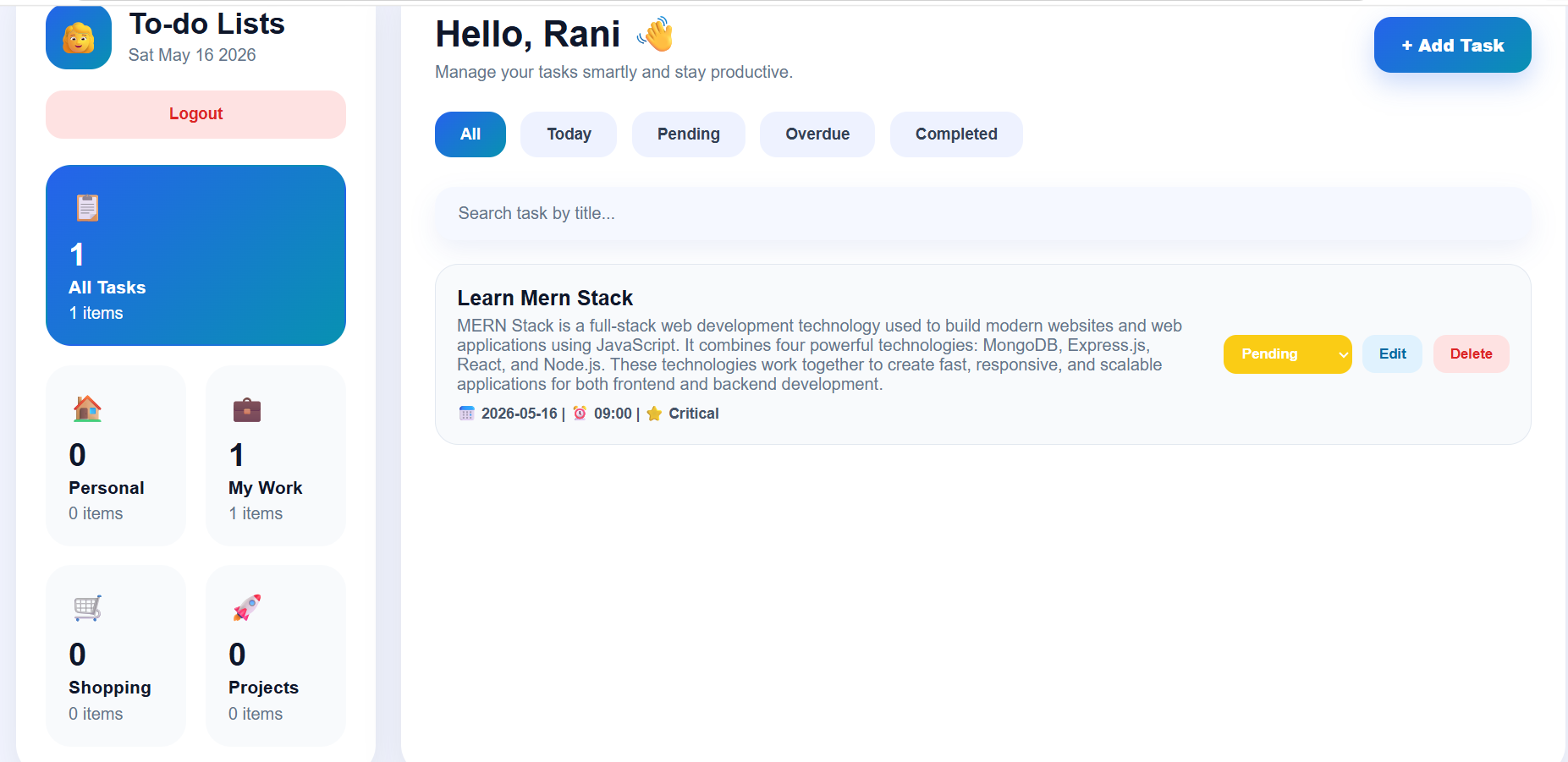
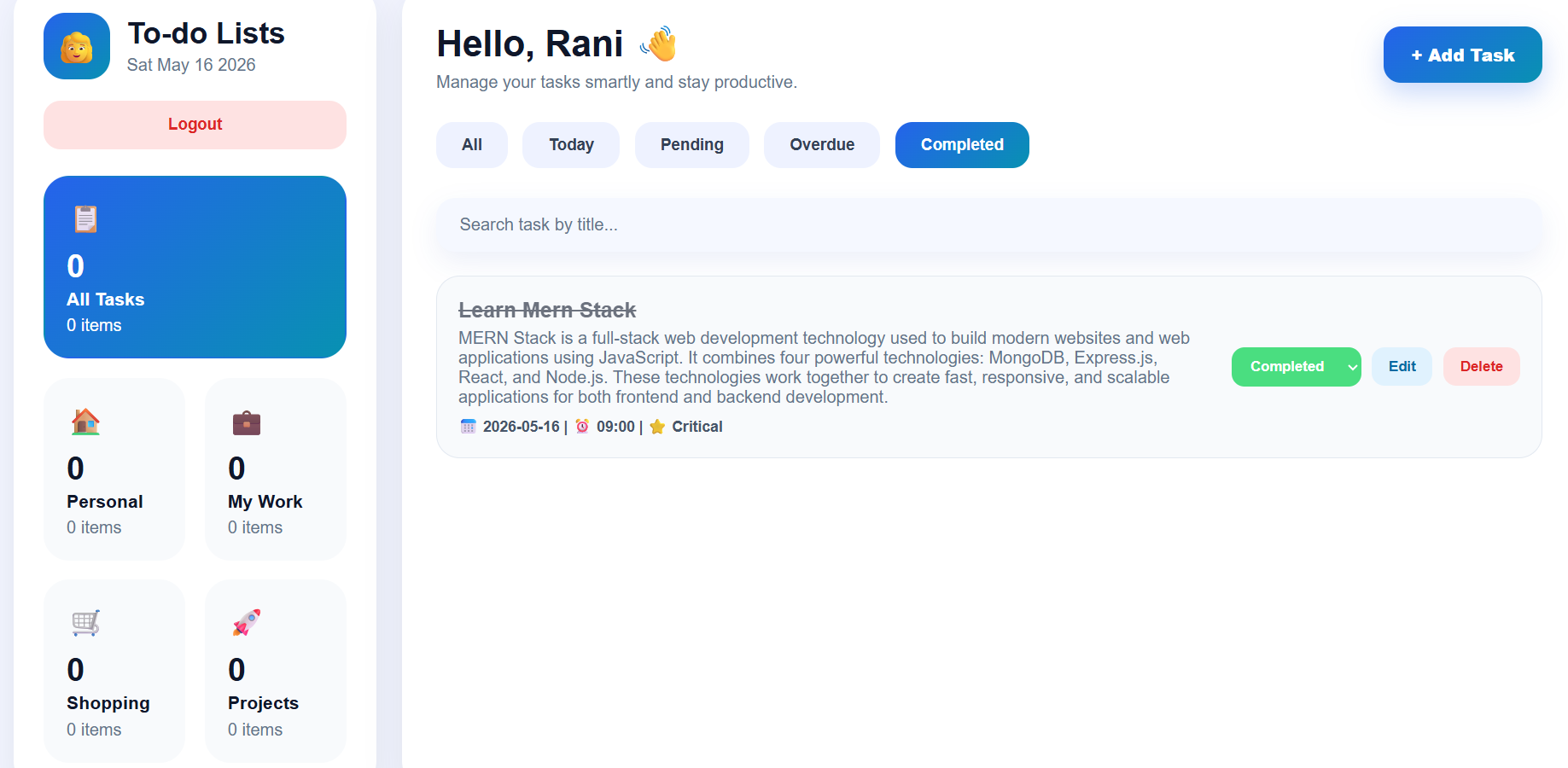
Output Screens of To-Do List Application
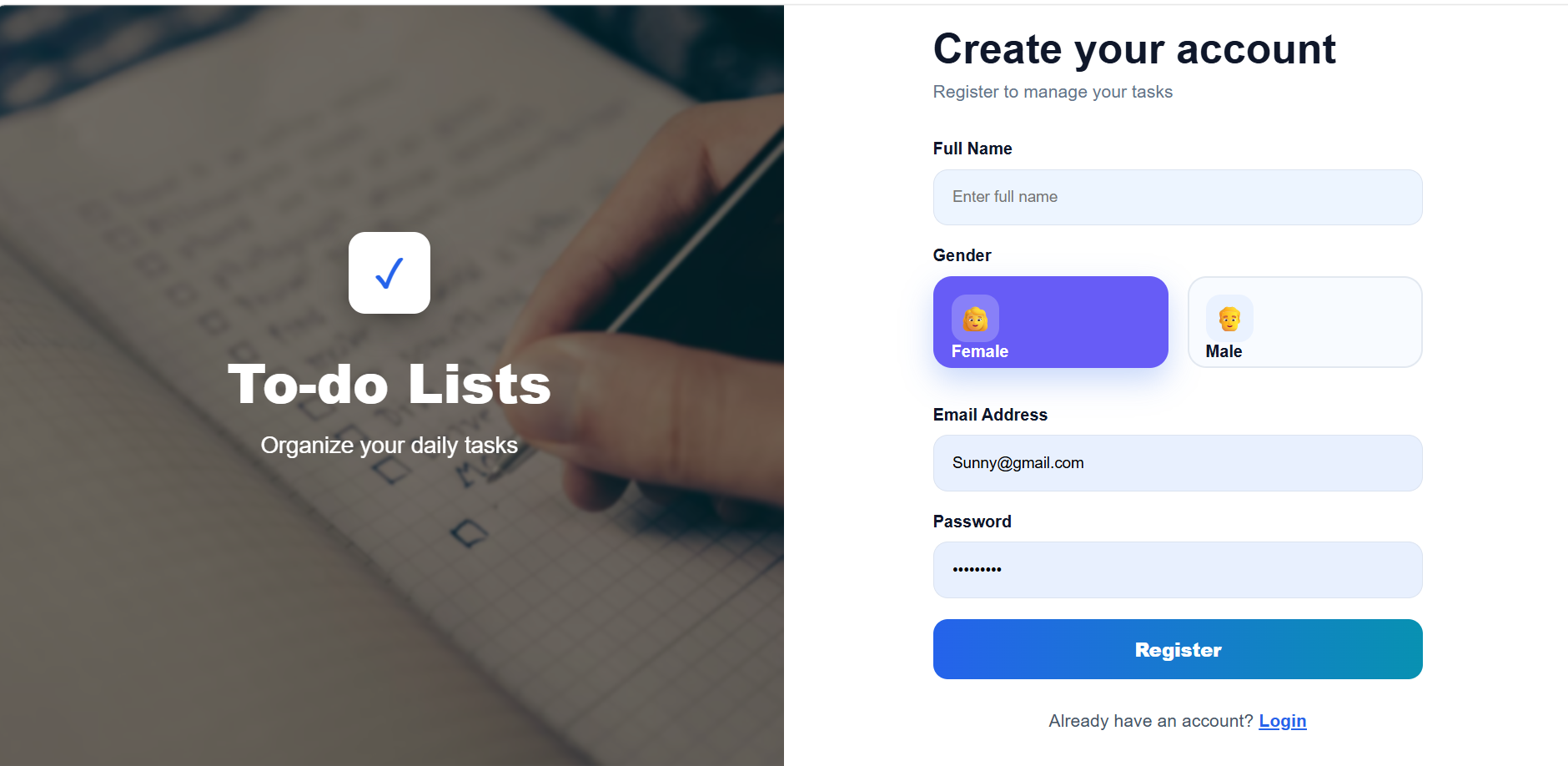
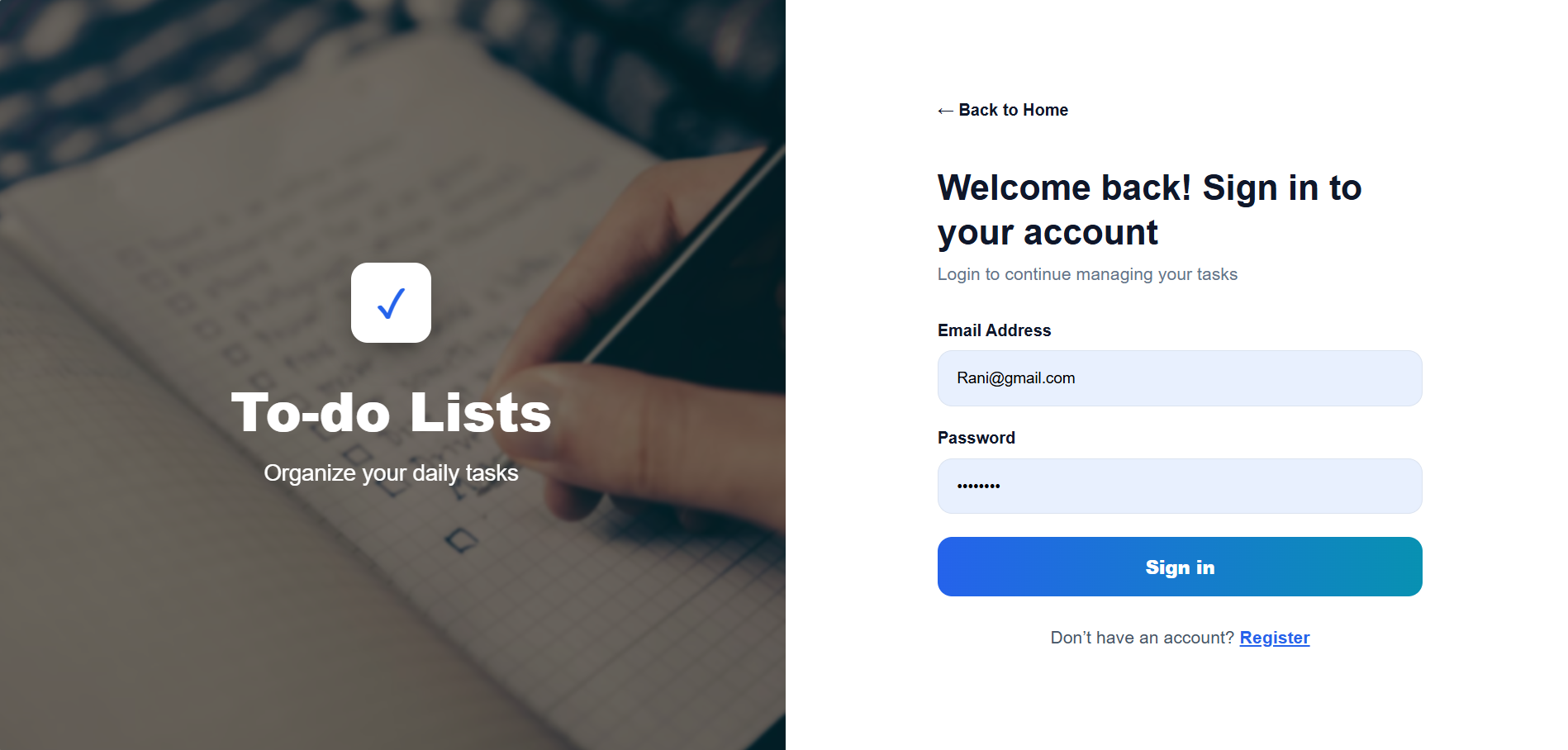
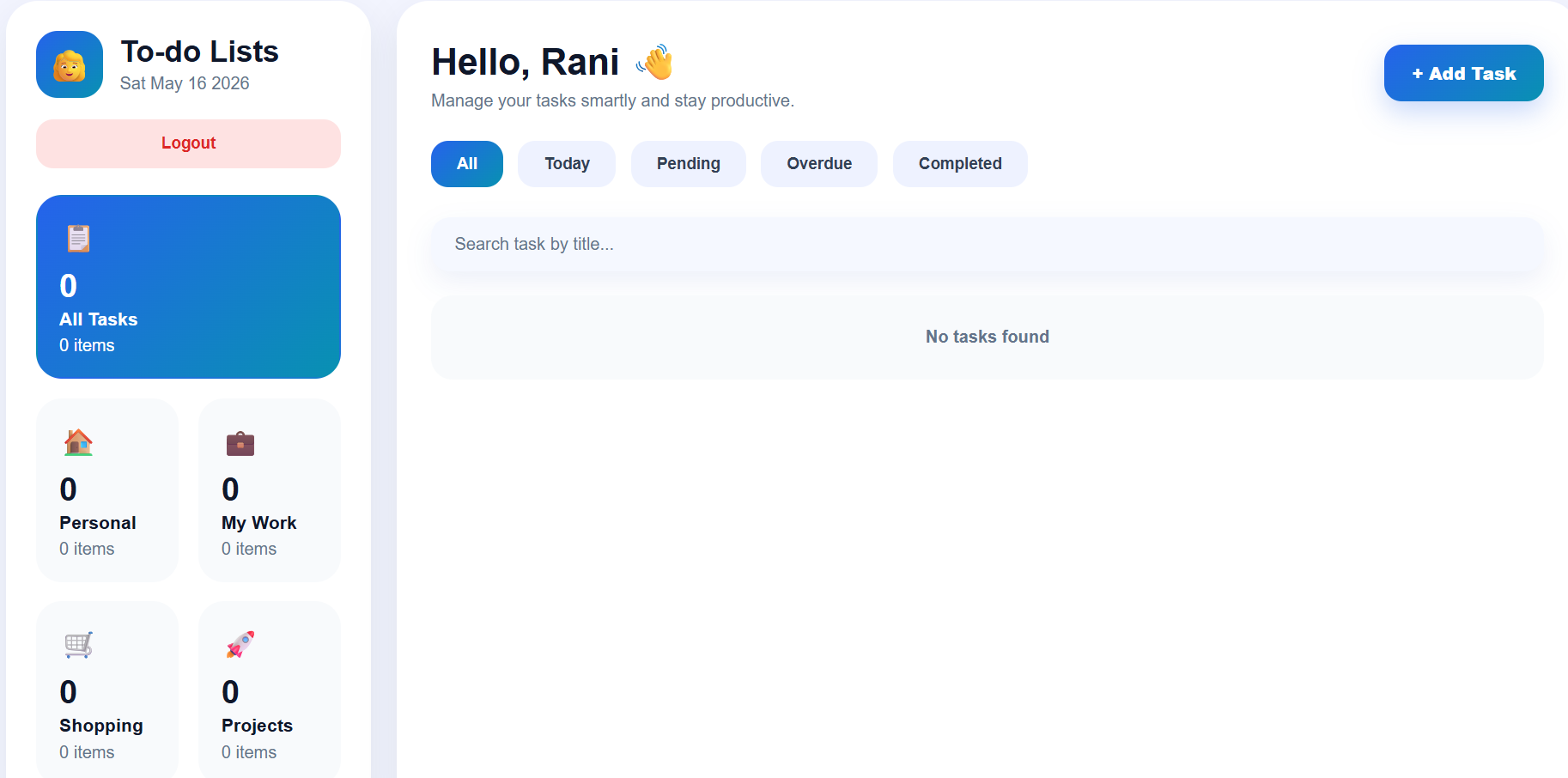
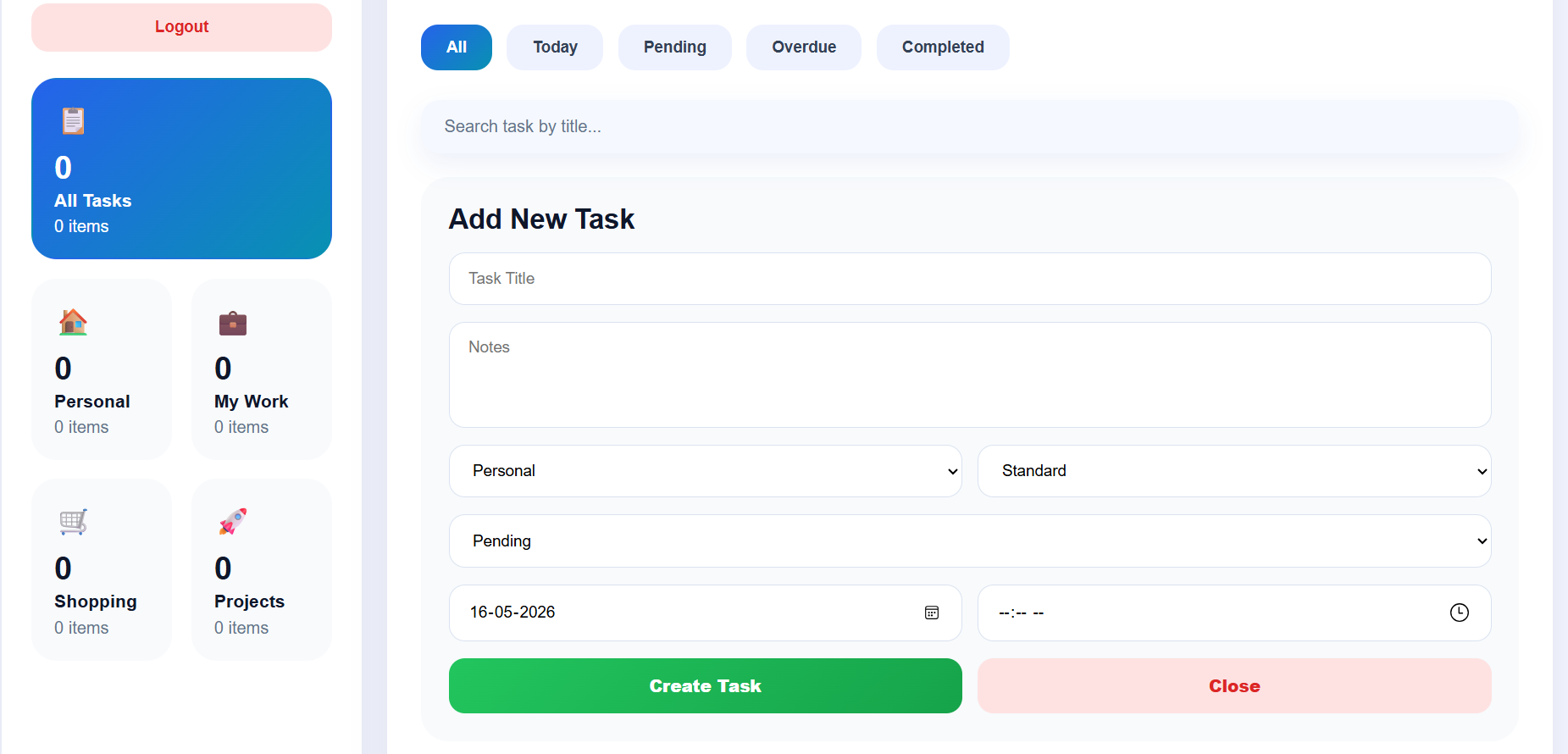
Correct File Flow for To-do List Project
Frontend Files
main.jsx
Starting point of React app. It loads App.jsx.
App.jsx
Controls routes like Login, Register, and Dashboard.
Login.jsx
Used for user login. Sends login data to backend authRoutes.js.
Register.jsx
Used for user registration. Sends user data to backend authRoutes.js.
Dashboard.jsx
Main page of the To-Do App. It handles adding tasks, viewing tasks, editing tasks, deleting tasks, searching tasks, categories, pending tasks, completed tasks, and overdue tasks.
App.css
Used for styling the application.
Backend Files
server.js
Main backend file. It starts the server, connects MongoDB, and uses routes.
User.js
Stores user data like name, email, and password.
Todo.js
Stores task data like title, description, category, status, and due date.
authRoutes.js
Handles register and login API routes.
todoRoutes.js
Handles add, get, update, delete, and complete task routes.
authMiddleware.js
Checks JWT token before allowing users to access tasks.
.env
Stores MongoDB URL, port number, and JWT secret.
Main Features of To-Do App
1. User Authentication
Users can create account and login securely.
Features
- Register account
- Login account
- Logout
- JWT token security
- Password encryption using bcrypt
Files Used
Register.jsxLogin.jsxauthRoutes.jsUser.jsauthMiddleware.js
2. Add Task Feature
Users can create new tasks.
Example
- Title
- Description
- Due Date
- Category
- Priority
Files Used
todoRoutes.js
Todo.js
3. View Tasks Feature
Displays all created tasks.
Features
Tasks
Search
Categories
Task management
Pending and completed tasks
Files Used
Dashboard.jsx
4. Edit Task Feature
Users can update task details.
Example
Change:
- Title
- Due date
- Status
- Priority
Files Used
Dashboard.jsx
5. Delete Task Feature
Users can remove unwanted tasks.
Files Used
todoRoutes.js
6. Complete Task Feature
Users can mark tasks as completed.
Features
- Completed tasks section
- Status update
- Task movement
Files Used
Dashboard.jsx
Todo.js
7. Search Task Feature
Users can search tasks quickly.
Example
Search by:
- Task title
- Category
Files Used
Dashboard.jsx
8. Task Categories Feature
Tasks can be grouped into categories.
Example Categories
- Personal
- Shopping
- My Work
- Projects
Files Used
Dashboard.jsx
9. Pending Tasks Feature
Shows tasks not completed yet.
Files Used
Dashboard.jsxTodo.js
10. Overdue Tasks Feature
Shows tasks whose due date is crossed.
Files Used
Dashboard.jsx
Simple File Explanation
FRONTEND FILES
main.jsx
Purpose
Starting point of React app.
What it does
Loads full application.
Flow
main.jsx → opens → App.jsx
App.jsx
Purpose
Controls all pages and routes.
What it does
Decides which page to show.
Example
- Login page
- Register page
- Dashboard page
Login.jsx
Purpose
User login page.
What it does
Checks email and password.
Connected Files
authRoutes.js
Register.jsx
Purpose
New user registration page.
What it does
Creates new account.
Dashboard.jsx
Purpose
Main working page of app.
What it does
Shows:
Tasks
Search
Categories
Task management
Pending and completed tasks
BACKEND FILES
server.js
Purpose
Main backend starting file.
What it does
- Starts server
- Connects MongoDB
- Uses routes
User.js
Purpose
Stores user database structure.
Stores
- Name
- Password
Todo.js
Purpose
Stores task database structure.
Stores
- Title
- Description
- Status
- Category
- Due date
authRoutes.js
Purpose
Handles login/register routes.
Example
/login/register
todoRoutes.js
Purpose
Handles task routes.
Example
- Add task
- Delete task
- Update task
- Complete task
authMiddleware.js
Purpose
Protects private routes.
What it does
Checks JWT token before accessing tasks.
DATA BASE
Correct database flow:
Todo.js and User.js are Mongoose models.
They define how data should be stored in MongoDB.
Simple Complete Flow
User opens app
↓
main.jsx starts React
↓
App.jsx opens Login/Register/Dashboard
↓
User login/register
↓
authRoutes.js handles authentication
↓
User.js stores user data in MongoDB
↓
After login, user enters Dashboard
↓
Dashboard sends task request to todoRoutes.js
↓
authMiddleware.js checks JWT token
↓
Todo.js stores task data in MongoDB
↓
Response comes back
↓
Dashboard updates tasks
Summary
The To-Do List App is a MERN Stack project used to manage daily tasks efficiently.
React.js is used for the frontend UI, Node.js and Express.js handle the backend APIs, and MongoDB stores task data. JWT tokens and bcrypt provide secure authentication.
The application follows full-stack architecture to perform CRUD operations smoothly between frontend, backend, and database.
Keywords
To-Do List App, MERN Stack Project, Task Management Application, React.js Project, Node.js Backend, Express.js API, MongoDB Database, CRUD Application, Full Stack Development, Task Tracking System, Daily Task Manager, JWT Authentication, bcrypt Password Hashing, React Router DOM, Axios API Calls, Web Development Project, MERN Stack CRUD App, Productivity Application, Task Organizer, Frontend Development, Backend Development.
Unlock New Career Opportunities
⬇️



