
Arrow Functions
Arrow Functions in JavaScript are a shorter and modern way of writing functions.
They use the arrow symbol (=>) instead of the traditional function keyword.
Arrow functions help make code cleaner, shorter, and easier to read.
They are widely used in modern JavaScript, React.js, and web development projects.
Arrow functions are useful for performing quick operations and callbacks.
Learning arrow functions helps students write professional and modern JavaScript code.
What are Arrow Functions
An Arrow Function is a compact way to define a function using the arrow (=>) operator.
Regular Function
function greet() {
 return "Welcome Students";
 }
Arrow Function
const greet = () => {
return "Welcome Students";
 };
Both functions perform the same task, but the arrow function uses fewer lines of code.
Why Use Arrow Functions
Arrow functions provide several advantages:
- Shorter and cleaner syntax
- Less code to write
- Easy to read and maintain
- Supports implicit return
- Useful for callback functions
- Commonly used in React.js
- Improves code readability
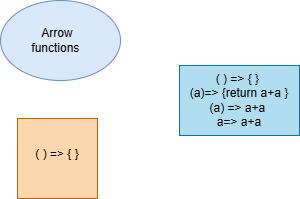
Explanation of Arrow Functions
- Arrow Functions provide a short syntax for creating functions.
- They use the
=>(arrow operator) in function definition. - Arrow functions reduce the amount of code written by programmers.
- They are commonly used in React.js and modern JavaScript applications.
- Arrow functions improve code readability and maintainability.
- They are useful for small calculations and callback functions.
- Arrow functions make JavaScript coding faster and more efficient.
Features of Arrow Functions
Key Features
- Uses the
=>operator - Does not use the
functionkeyword - Supports implicit return
- Can be written in one line
- Uses lexical
thisbinding - Ideal for callbacks and event handling
- Widely used in modern web development
Arrow Functions with One Parameter
If a function has only one parameter, you can omit the parentheses:
With Parantheses
const square = (x) => x * x;Without Parantheses
const square = x => x * x;Arrow Functions Return Value by Default
In JavaScript Arrow Functions, if the function contains only one statement, you can write the code in a shorter way.
You can remove the curly brackets {} and the return keyword.
JavaScript will automatically return the value by default.
This makes the code cleaner, shorter, and easier to understand.
This feature is widely used in modern JavaScript and React.js development.
Arrow Functions vs. Regular Functions
| Feature | Arrow Functions | Regular Functions |
|---|---|---|
this Keyword |
Uses lexical binding from surrounding scope | this changes depending on how the function is called |
| Syntax | Short and concise syntax using => |
Uses the traditional function keyword |
| Arguments Object | Does not have its own arguments object |
Has its own arguments object |
| Constructor Usage | Cannot be used with new keyword |
Can be used as a constructor |
| Object Methods | Not recommended for object methods | Commonly used for object methods |
| Return Statement | Supports implicit return for single expressions | Must use the return keyword |
| Code Length | Cleaner and shorter code | Longer syntax compared to arrow functions |
| Best Usage | Best for callbacks and short functions | Best for object methods and constructors |
Real-Time Scenarios of Arrow Functions
- Social media websites use arrow functions for button click events.
- Shopping websites use arrow functions for cart calculations and filtering products.
- Games use arrow functions for score updates and player actions.
- Educational websites use arrow functions for quiz timers and score calculations.
- Banking applications use arrow functions for transaction processing.
- React.js applications heavily use arrow functions in components and event handling.
- Online forms use arrow functions for validation and user input checking.
Syntax of Arrow Function
const functionName = () => {
    // code
};
Arrow Function with Parameters Syntax
const add = (a, b) => {
    return a + b;
};
Example
<!DOCTYPE html>
<html>

<head>
    <title>Arrow Functions</title>
</head>

<body>

<h1>JavaScript Arrow Function Example</h1>

<p id="demo"></p>

<script>

const greet = () => {
    document.getElementById("demo").innerHTML =
    "Welcome to Arrow Functions";
};

greet();

</script>

</body>
</html>
Output
Welcome to Arrow FunctionsAdvantages of Arrow Functions
- Cleaner syntax
- Less code
- Better readability
- Faster development
Summary
Arrow Functions in JavaScript are a modern and concise way of writing functions using the arrow operator (=>). They reduce code length, improve readability, and support implicit returns. Arrow functions are widely used in React.js, modern web applications, event handling, and callback functions. While they are excellent for short and simple functions, regular functions are still preferred for object methods and constructors. Understanding arrow functions helps students write cleaner, faster, and more professional JavaScript code.
Keywords
Arrow Functions in JavaScript, JavaScript Arrow Function Tutorial, Arrow Functions ES6, JavaScript Modern Functions, Arrow Functions vs Regular Functions, JavaScript Function Syntax, React Arrow Functions, JavaScript Callback Functions, Learn Arrow Functions, JavaScript Programming Basics, Frontend Development, JavaScript Coding Examples, JavaScript Interview Questions, JavaScript Web Development



