
Introduction to JavaScript
JavaScript is a powerful, high-level, and widely used programming language that helps developers create interactive, dynamic, and responsive web pages. It enables websites to react to user actions such as button clicks, form submissions, mouse movements, keyboard inputs, and many other events.
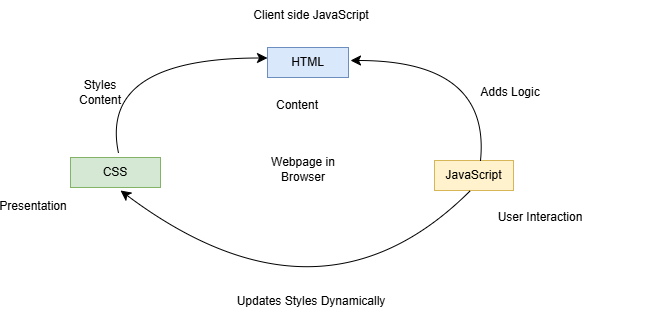
JavaScript works together with HTML and CSS to build modern websites and web applications. While HTML provides the structure and CSS provides the design, JavaScript adds functionality and behavior to web pages.
How JavaScript Works
- Client Side: On the client side, JavaScript works along with HTML and CSS. HTML adds structure to a web page, CSS styles it, and JavaScript brings it to life by allowing users to interact with elements on the page, such as actions on clicking buttons, filling out forms, and showing animations. JavaScript on the client side is directly executed in the user's browser.
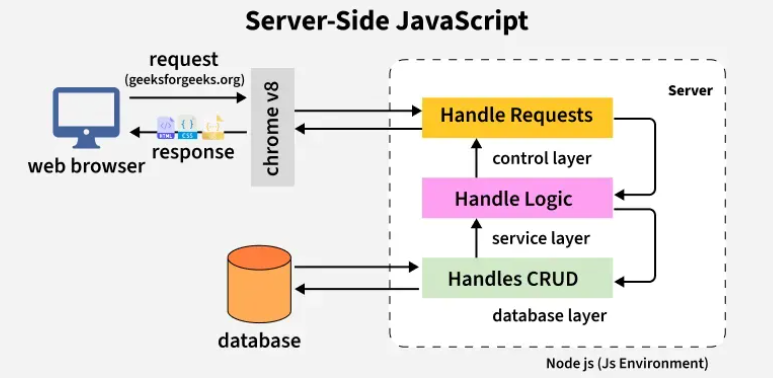
- Server Side: On the Server side (on Web Servers), JavaScript is used to access databases, file handling, and security features to send responses, to browsers.
Why Learn JavaScript?
JavaScript is one of the most valuable programming skills in today's technology industry.
Benefits of Learning JavaScript
- Core language of web development
- Creates dynamic and interactive websites
- Easy to learn for beginners
- Supports object-oriented programming
- Enables event-driven programming
Applications of JavaScript
JavaScript is used in many areas of software development.
Web Development
Creating dynamic websites and web applications.
Mobile App Development
Building Android and iOS applications using frameworks like React Native.
Game Development
Creating browser-based games and interactive experiences.
Desktop Applications
Developing desktop software using Electron.js.
Artificial Intelligence
Building AI-powered web applications and chatbots.
Explanation of JavaScript
- JavaScript adds interactivity to webpages.
- It helps create animations, sliders, games, and dynamic effects.
- JavaScript can validate forms before sending data.
- It allows websites to update content without reloading the page.
- JavaScript works in all major web browsers like Chrome, Edge, and Firefox.
- It is widely used in web development, mobile apps, and games.
- Learning JavaScript helps students build real-world projects and modern websites.
Real-Time Scenarios of JavaScript
- When you click the Like button on social media, JavaScript handles the action.
- Online shopping websites use JavaScript to update the cart total instantly.
- YouTube uses JavaScript for video controls and autoplay features.
- Online forms use JavaScript to check if the email or password is correct.
- JavaScript helps create popup messages and notifications.
- Google Maps uses JavaScript for zooming and navigation features.
- Educational websites use JavaScript for quizzes, timers, and interactive learning tools.
Syntax:
let variableName = value;

function functionName() {
    // code to execute
}
Example:
<!DOCTYPE html>
<html>
<body>

<h2 id="demo">Hello Students</h2>

<button onclick="changeText()">Click Me</button>

<script>
function changeText() {
  document.getElementById("demo").innerHTML = "Welcome to JavaScript!";
}
</script>

</body>
</html>
Output:
Hello Students
Click Here
After click
Welcome to JavaScript
Advantages of JavaScript
- Easy to learn
- Fast execution
- Interactive user experience
- Cross-platform compatibility
- Large community support
- Works with modern frameworks
Summary
- Easy to learn for beginners
- Used in frontend and backend development
- Supports interactive webpages
- Works with HTML and CSS
- Popular in web and app development
- Used by companies like Google, Facebook, and Amazon
Keywords
JavaScript Tutorial,Introduction to JavaScript,Learn JavaScript for Beginners,JavaScript Programming Language,JavaScript Examples,Client Side JavaScript,Server Side JavaScript



