
Event Handling
Event Handling is the process of writing JavaScript code that responds to events happening in the browser.
Event Handling in JavaScript means writing code to control how a webpage responds when an event happens. An event can be a user action such as clicking a button, typing in an input box, submitting a form, or moving the mouse.
JavaScript detects these events and runs specific code based on the user action. This makes websites interactive, dynamic, and user-friendly.
Example Events
- User clicks a button
- User submits a form
- User types in an input field
- User moves the mouse
- Page finishes loading
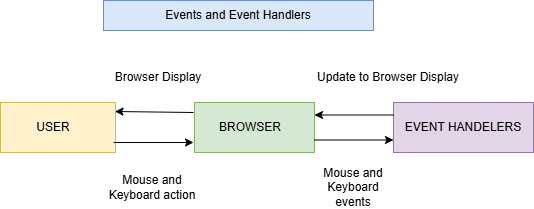
This diagram illustrates how JavaScript Events and Event Handlers work together to create interactive web pages.
| Component | Description |
|---|---|
| User | The person interacting with the webpage using a mouse or keyboard. |
| Browser | Displays the webpage and detects user actions. |
| Event Handlers | JavaScript functions that respond to events and perform actions. |
Why Event Handling is Important
Makes webpages interactive and engaging for users.
• Helps handle user actions such as clicks, typing, and mouse movements.
• Improves user experience by providing instant responses.
• Supports form validation before data is submitted.
• Allows dynamic changes to webpage content and styles.
• Helps build modern web applications with interactive features.
• Reduces unnecessary page reloads and improves performance.
• Enables real-time updates without refreshing the page.
Ways to Handle Events in JavaScript
JavaScript provides different ways to handle events.
Main Event Handling Methods
| Method | Description | Recommended |
|---|---|---|
| Inline Event Handling | Event written inside HTML tag | No |
| DOM Property Method | Event assigned using JavaScript property | Limited Use |
| addEventListener() | Modern and clean way to handle events | Yes |
1. Inline Event Handling
Definition
Inline event handling means writing the event directly inside the HTML element.
This method works, but it is not recommended in modern JavaScript because it mixes HTML and JavaScript together.
Syntax
<tag event="functionName()">Content</tag>Example
<!DOCTYPE html>
<html>
<head>
    <title>Events Demo</title>
</head>
<body>

    <button id="btn">Click Me</button>

    <script>
        let btn = document.getElementById("btn");

        btn.addEventListener("click", function() {
            console.log("Hello");
        });
    </script>

</body>
</html>
Output
HelloProblems of Inline Event Handling
- It mixes HTML and JavaScript
- Code becomes hard to manage
- Not suitable for large projects
- Reusing code becomes difficult
- Debugging becomes harder
Real-Time Scenario
For small demo programs, inline events may be used. But in real websites such as login pages, shopping carts, or dashboards, inline event handling is avoided because the code becomes messy.
2. DOM Property Method
Definition
In the DOM Property Method, an event is assigned to an HTML element using a JavaScript property such as onclick.
This method keeps JavaScript separate from HTML, but it has one main limitation: only one event handler can be assigned at a time for the same event.
Syntax
element.eventName = function()
{ // code to execute
 };
Example
<!DOCTYPE html>
<html>
<head>
    <title>Events Demo</title>
</head>
<body>

    <button id="btn">Click Me</button>

    <script>
        let btn = document.getElementById("btn");

        btn.onclick = function sayHello() {
            console.log("Clicked");
        };
    </script>

</body>
</html>
Output
Clicked3. addEventListener() Method
Definition
The addEventListener() method is the recommended and modern way to handle events in JavaScript.
It allows developers to attach one or more event handlers to the same element without overwriting previous handlers.
Syntax
element.addEventListener("eventName", function() {
// code to execute
 });
Example
<!DOCTYPE html>
<html>
<head>
    <title>Events Demo</title>
</head>
<body>

    <button id="btn">Click Me</button>

    <script>
        let btn = document.getElementById("btn");

        btn.addEventListener("click", function() {
            console.log("Btn clicked");
        });
    </script>

</body>
</html>
Output
Btn clickedAdvantages of addEventListener()
- Allows multiple event handlers
- Keeps code clean
- Does not overwrite existing event handlers
- Useful for large projects
- Easy to remove event listeners
- Recommended in modern JavaScript
Real-Time Scenario
In an e-commerce website, clicking the Add to Cart button may perform multiple actions:
- Add product to cart
- Update cart count
- Show success message
- Track user activity
This can be managed easily using addEventListener().
Multiple Event Handlers Using addEventListener()
The same element can have multiple event handlers for the same event.
Example
<!DOCTYPE html>
<html>
<head>
    <title>Events Demo</title>
</head>
<body>

    <button id="btn">Click Me</button>

    <script>
        let btn = document.getElementById("btn");

        btn.addEventListener("click", function() {
            console.log("First Handler");
        });

        btn.addEventListener("click", function() {
            console.log("Second Handler");
        });
    </script>

</body>
</html>
Output
| User Action | Console Output |
|---|---|
| Click the button | First Handler |
| Second Handler |
Event Object in JavaScript
Definition
The Event Object is automatically created by the browser when an event occurs.
It contains useful information about the event, such as:
- Type of event
- Target element
- Mouse position
- Keyboard key pressed
- Form input details
Event Bubbling in JavaScript
Definition
Event Bubbling means the event starts from the child element and moves upward to its parent elements.
In simple words:
Child Element → Parent Element → Body → HTML → DocumentDifference Between Event Handling Methods
| Feature | Inline Event Handling | DOM Property Method | addEventListener() |
| Code Location | Inside HTML | Inside JavaScript | Inside JavaScript |
| Clean Code | No | Better | Best |
| Multiple Handlers | No | No | Yes |
| Recommended | No | Limited | Yes |
| Suitable For | Small demos | Simple programs | Modern projects |
| Reusability | Low | Medium | High |
Real-Time Applications of Event Handling
1. Login Form Validation
Checks username and password when the user clicks the login button.
2. Shopping Cart
Updates cart count when the user clicks Add to Cart.
3. Quiz Application
Checks selected answers and displays score.
4. Dropdown Menu
Shows and hides menu items based on user clicks.
5. Search Bar
Displays suggestions while the user types.
6. Dashboard Applications
Updates charts and data based on button clicks.
Summary
Event Handling in JavaScript is used to control how webpages respond to user actions such as clicks, form submissions, typing, and mouse movement. JavaScript supports different event handling methods such as inline event handling, DOM property method, and addEventListener(). Among these, addEventListener() is the most recommended because it supports multiple event handlers and keeps code clean. Concepts like the Event Object, Event Bubbling, stopPropagation(), and removeEventListener() are important for building interactive and professional web applications.
Keywords
Event Handling in JavaScript, JavaScript Event Handling, addEventListener in JavaScript, Inline Event Handling JavaScript, DOM Property Event Handling, JavaScript Event Object, Event Bubbling in JavaScript, stopPropagation in JavaScript, removeEventListener JavaScript, JavaScript Events Tutorial, JavaScript click event, JavaScript event listener, Front-End Development.



