
DOM Manipulation
The DOM acts as a bridge between HTML and JavaScript, allowing web pages to become interactive.
DOM (Document Object Model) is a programming interface that represents an HTML document as a collection of objects and nodes.
It enables JavaScript to:
- Access HTML elements
- Modify content dynamically
- Change styles and attributes
- Respond to user actions
- Create and remove elements
Why is DOM Important
Without the DOM, web pages would remain static and unable to respond to user actions.
- Change webpage content dynamically without reloading the page.
- Change CSS styles such as colors, fonts, sizes, and layouts.
- Add new HTML elements like buttons, paragraphs, images, and lists.
- Remove existing elements from the webpage when they are no longer needed.
- Handle button clicks and events such as mouse movements, keyboard input, and form submissions.
- Create interactive user experiences by responding to user actions in real time.
- Update data without refreshing the page for smoother and faster web applications.
- Access and modify HTML elements using IDs, classes, and tags.
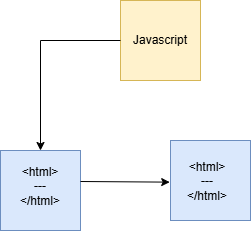
Example Based on the Diagram
| Element | Before Manipulation | After Manipulation |
|---|---|---|
| HTML Content | Original webpage content | Updated webpage content |
| CSS Styles | Default styles | Modified styles (color, size, etc.) |
| DOM Structure | Existing elements | New elements added or old elements removed |
| User Interface | Static page | Interactive and dynamic page |
Real-Time Applications of DOM
1. Online Shopping Websites
-
Add products to cart
-
Update cart count instantly
-
Display product details dynamically
2. Social Media Platforms
-
Like posts
-
Add comments
-
Update feeds without refreshing
3. Online Forms
-
Validate user input
-
Show error messages instantly
4. Learning Platforms
-
Display quiz questions dynamically
-
Show results immediately
5. Banking Applications
-
Display account balances
-
Update transaction history
DOM Element Selection Methods
Before changing any element, JavaScript must first locate it.
The DOM provides several methods for selecting HTML elements.
Common DOM Selectors
| Method | Purpose |
|---|---|
| getElementById() | Select element using ID |
| getElementsByClassName() | Select elements using class name |
| querySelector() | Select first matching element |
| querySelectorAll() | Select all matching elements |
1. getElementById() Method
Definition
The getElementById() method selects an element based on its unique ID.
Syntax
document.getElementById("idName");Example
<h1 id="title">Hello</h1>

<script>
let element = document.getElementById("title");
console.log(element);
</script>
Output
<h1 id="title">Hello</h1>When to Use
Use this method when you need to access a specific element that has a unique ID.
Real-Time Scenario
Selecting a login form or submit button using its ID.
2. getElementsByClassName() Method
Definition
This method selects all elements having the same class name.
Syntax
document.getElementsByClassName("className");Example
<p class="text">One</p>
<p class="text">Two</p>
 <script>
 let elements =
document.getElementsByClassName("text");

console.log(elements[1]);
</script>
Output
<p class="text">Two</p>Real-Time Scenario
Selecting multiple product cards having the same CSS class.
3. querySelector() Method
Definition
The querySelector() method selects the first matching element.
Syntax
document.querySelector("selector");Example
<p class="text">One</p>
<p class="text">Two</p>

<script>
let element =
document.querySelector(".text");

console.log(element);
</script>
Output
<p class="text">One</p>Real-Time Scenario
Selecting the first notification message on a webpage.
4. querySelectorAll() Method
Definition
The querySelectorAll() method selects all matching elements.
Syntax
document.querySelectorAll("selector");Example
<p class="text">One</p>
<p class="text">Two</p>

<script>
let elements =
document.querySelectorAll(".text");

console.log(elements[0]);
</script>
Output
<p class="text">One</p>Real-Time Scenario
Selecting all menu items, cards, or buttons on a webpage.
Advantages of DOM
- Makes webpages interactive by allowing users to interact with buttons, forms, menus, and other elements.
- Updates content dynamically without needing to reload the entire webpage.
- Improves user experience by providing faster and smoother interactions.
- Supports real-time updates such as live notifications, chat messages, and scoreboards.
- Reduces page reloads which helps save time and improves website performance.
- Enables modern web applications like social media platforms, online editors, and e-commerce websites.
- Provides easy communication between HTML and JavaScript for manipulating webpage elements.
Summary
The Document Object Model (DOM) is a powerful feature of JavaScript that enables developers to interact with HTML elements dynamically. Using DOM methods such as getElementById(), getElementsByClassName(), querySelector(), and querySelectorAll(), developers can access webpage elements easily. Properties like innerHTML and textContent help update content, while the style property allows dynamic CSS modifications. The DOM is the foundation of modern web development and is used extensively in interactive websites, e-commerce platforms, social media applications, dashboards, and web-based systems.
Keywords
JavaScript DOM, DOM in JavaScript, Document Object Model, JavaScript DOM Tutorial, getElementById JavaScript, getElementsByClassName Example, querySelector JavaScript, querySelectorAll Example, innerHTML vs textContent, DOM Manipulation in JavaScript, Change HTML Content Using JavaScript, Change CSS Using JavaScript, JavaScript Web Development, JavaScript DOM Methods, JavaScript Interview Questions, Front-End Development, Dynamic Web Pages.



