
Loops
Loops in JavaScript are used to repeat a block of code multiple times automatically.
They help programmers avoid writing the same code again and again.
Loops are very important in web development, games, applications, and automation tasks.
JavaScript provides different types of loops such as for loop, while loop, and do...while loop.
Loops make programs faster, shorter, and more efficient.
Learning loops helps students improve their logical thinking and coding skills.
Why are Loops Important?
Loops provide several benefits:
- Reduce duplicate code
- Save development time
- Improve code readability
- Automate repetitive tasks
- Process large amounts of data
- Increase application efficiency
Types of Loops in JavaScript
JavaScript provides three main loop structures.
| Loop Type | Purpose |
|---|---|
| for Loop | Used when the number of repetitions is known |
| while Loop | Used when repetitions are unknown |
| do...while Loop | Executes at least once before checking the condition |
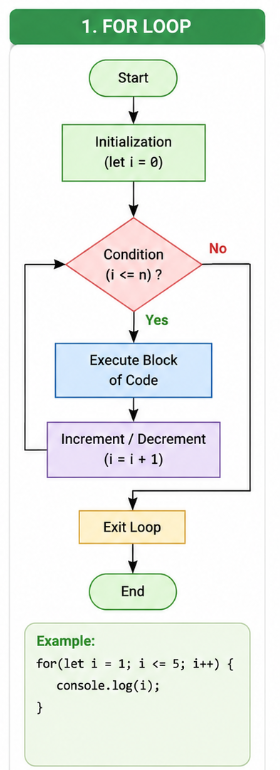
For Loop
- The for loop is used when the number of repetitions is already known.
- The flowchart starts with initialization of the loop variable.
- Next, the condition is checked.
- If the condition is true, the code block executes.
- After execution, the variable is incremented or decremented.
- The process repeats until the condition becomes false.
- Finally, the loop stops and moves to the next statement.
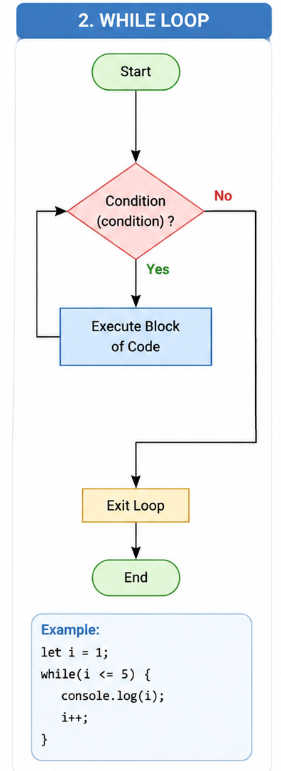
While Loop
- The while loop checks the condition before execution.
- The flowchart begins with the condition checking step.
- If the condition is true, the code block runs.
- After execution, the condition is checked again.
- The loop continues while the condition remains true.
- When the condition becomes false, the loop exits.
- The while loop is useful when repetitions are unknown.
How the while Loop Works
- Condition is checked first.
- If true, code executes.
- Variable is updated.
- Condition is checked again.
- Loop stops when condition becomes false.
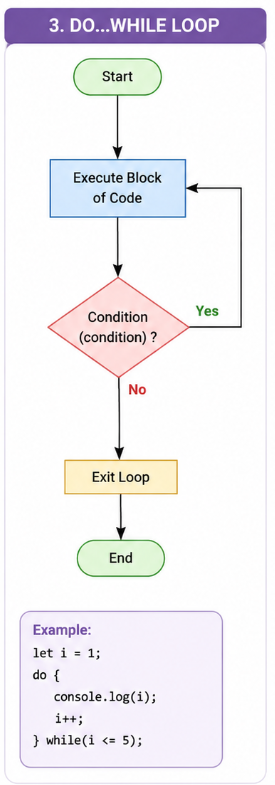
Do...While
- The do...while loop executes the code before checking the condition.
- The flowchart first enters the execution block.
- After execution, the condition is checked.
- If the condition is true, the loop repeats.
- If the condition becomes false, the loop stops.
- This loop always executes at least one time.
- It is commonly used in menus, games, and input systems.
How the do...while Loop Works
- Code executes first.
- Condition is checked afterward.
- If true, loop repeats.
- If false, loop stops.
Key Difference Between Loops
| Loop Type | Condition Check | Execution |
|---|---|---|
| for loop | Before execution | Fixed repetitions |
| while loop | Before execution | Unknown repetitions |
| do...while loop | After execution | Executes at least once |
Explanation
- Loops help execute code repeatedly based on conditions.
- They reduce duplicate code in programs.
- The for loop is mostly used when the number of repetitions is known.
- The while loop runs until a condition becomes false.
- The do...while loop executes at least one time before checking the condition.
- Loops improve program efficiency and save development time.
- JavaScript loops are widely used in games, websites, calculators, and apps.
When to Use Each Loop
| Loop Type | Recommended Usage |
| for Loop | Printing numbers, arrays, fixed repetitions |
| while Loop | User input validation, unknown repetitions |
| do...while Loop | Menus, game systems, retry operations |
Real-Time Scenarios
- Social media apps use loops to display multiple posts and comments.
- Online shopping websites use loops to show product lists.
- Games use loops to continuously update scores and player movements.
- School software uses loops to process student records.
- Calculator apps use loops for repeated mathematical operations.
- YouTube uses loops to load and display video recommendations.
- Banking systems use loops to process multiple transactions.
Syntax
for(initialization; condition; increment) {
    // code
}
while(condition) {
    // code
}
do {
    // code
}
while(condition);
Example
<!DOCTYPE html>
<html>

<head>
    <title>JavaScript Loops</title>
</head>

<body>

<h1>JavaScript Loop Example</h1>

<p id="demo"></p>

<script>

let text = "";

for(let i = 1; i <= 5; i++) {
    text += "Number: " + i + "<br>";
}

document.getElementById("demo").innerHTML = text;

</script>

</body>
</html>
Output
Number: 1
Number: 2
Number: 3
Number: 4
Number: 5
Advantages of Loops
- Reduce repetitive code
- Improve readability
- Save development time
- Process large datasets efficiently
- Increase program performance
- Simplify automation tasks
Summary
- Loops help repeat code automatically.
- They reduce code duplication and improve readability.
- JavaScript supports multiple loop types.
- Loops are important for automation and logic building.
- They are widely used in real-world applications and websites.
Keywords
Loops in JavaScript, JavaScript for Loop, JavaScript while Loop, JavaScript do while Loop, JavaScript Loop Examples, JavaScript Iteration, JavaScript Programming Tutorial, Learn JavaScript Loops, JavaScript Web Development, JavaScript Coding Examples, Frontend Development, JavaScript Interview Questions, JavaScript Automation, JavaScript Loop Syntax



