
if–else Statement
The if-else statement in Python is used to execute one block of code when the condition is True and another block of code when the condition is False.
What is an If-Else Statement in Python
The if-else statement is a conditional statement used when a program has two possible choices.
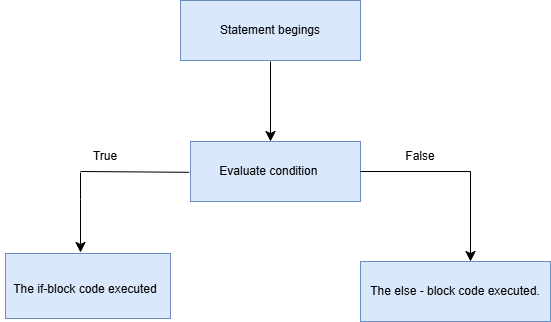
- If the condition is True, Python executes the if block
- If the condition is False, Python executes the else block
Only one block executes at a time.
If-Else Statement in Python
The if-else statement is one of the most important decision-making concepts in Python programming.
It helps programs choose between two different actions based on a condition.
In real life, we make decisions every day:
- If marks are greater than or equal to 35 → Pass
- Else → Fail
- If age is greater than or equal to 18 → Eligible to Vote
- Else → Not Eligible to Vote
- If temperature is greater than 30 → Hot Day
- Else → Cool Day
Similarly, Python programs also make decisions using the if-else statement.
Why If-Else Statements are Important
If-else statements are important because they help programs:
- make decisions
- choose between two actions
- validate conditions
- create interactive applications
- build real-world systems
Without if-else statements, programs cannot respond differently to different situations.
Real-Time Examples of If-Else Statements
| Condition | If Block | Else Block |
|---|---|---|
| Marks >= 35 | Pass | Fail |
| Age >= 18 | Eligible to Vote | Not Eligible |
| Number % 2 == 0 | Even Number | Odd Number |
| Temperature > 30 | Hot Day | Cool Day |
if - else Keywords
| Keyword | Purpose |
|---|---|
if |
Checks the condition |
else |
Executes when condition becomes False |
Real-Time Scenarios
- If you study → pass, else → fail
- If switch is ON → light glows, else → OFF
- If ticket is available → travel, else → stay
- If number is even → do one task, else → another task
- If password is correct → login, else → error
Syntax
if condition:
    statements
else:
    statements
Explanation of Syntax
| Part | Meaning |
|---|---|
if |
Checks the condition |
condition |
Expression returning True or False |
: |
Colon symbol required |
else |
Executes when condition is False |
statements |
Block of executable code |
Important Points About If-Else Statement
- Only one block executes at a time
- Proper indentation is mandatory
- Colon
:is required afterifandelse - Conditions always return True or False
Example 1
num = 10
if num % 2 == 0:
    print("Even")
else:
    print("Odd")
Output:
EvenExample 2
age = 15
if age >= 18:
    print("Adult")
else:
    print("Minor")
Output:
MinorMultiple Statements Inside If and Else Blocks
if False:
    print("True Block")
    print("This is one more line in if block")
else:
    print("Else Block")
    print("This is one more line in Else block")
Output:
Else Block
This is one more line in Else block
Understanding the Program Flow
The program first checks the condition.
If Condition is True
- the if block executes
If Condition is False
- the else block executes
Real-Time Applications of If-Else Statements
| Application | Usage |
|---|---|
| ATM Machines | Balance checking |
| Login Systems | Password validation |
| Online Shopping | Discount eligibility |
| School Software | Pass or fail checking |
| Gaming Apps | Level unlocking |
Common Beginner Mistakes
| Mistake | Problem |
|---|---|
Forgetting colon : |
Syntax error |
| Wrong indentation | Indentation error |
Using = instead of == |
Logical error |
| Forgetting type conversion | Input treated as string |
Summary
The if-else statement in Python is used for decision making when there are two choices.
- If condition is True → if block executes
- If condition is False → else block executes
Important concepts include:
- conditions
- indentation
- colon usage
- Boolean values
If-else statements are widely used in real-world applications such as login systems, ATM machines, gaming apps, voting systems, and student result systems.



