
break Statement
The break statement is one of the most important control statements in Python loops.
It is used when we want to stop a loop immediately before it finishes all repetitions.
Sometimes during loop execution, we may already get the required result and no longer need to continue the loop.
Why Break Statement is Important
The break statement is important because it helps programs:
- stop unnecessary repetitions
- improve efficiency
- reduce processing time
- control loop execution
- create interactive applications
What is the Break Statement
The break statement is used to terminate or stop a loop instantly.
When Python encounters the break statement:
- the loop immediately stops
- control moves outside the loop
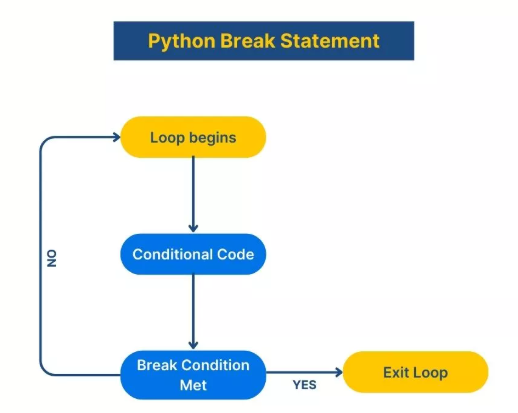
How Break Statement Works
When Python identifies the break statement:
- the current loop ends immediately
- remaining loop iterations are skipped
- program execution continues outside the loop
Real-World "Break" Scenarios
-
Password Entry: Once you type the correct password, the app stops asking you to log in.
-
Searching a List: If you are looking for "Pizza" on a menu, you stop reading the menu once you find it.
-
Gaming: If a player loses all their "lives," the game loop stops immediately.
How it Looks like
The Pattern:
for item in list:
    if condition:
        break  # The "Stop" Button
Example 1: The Number Search
If we tell a loop to count to 5 but put a break at 3:
for i in range(1, 6):
    if i == 3:
        break
    print(i)
Output: 1, 2
Example 2: The While Loop Stop
i = 1
while i <= 5:
    if i == 4:
        break
    print(i)
    i += 1
Output:
1,2,3Flow of Break Statement
- Loop starts
- Condition is checked
- If break condition becomes True:
- loop stops immediately
- Remaining statements are skipped
Difference Between Normal Loop and Break Loop
| Normal Loop | Break Loop |
|---|---|
| Runs completely | Stops early |
| Executes all iterations | Executes until break condition |
| No early termination | Immediate termination |
Nested Loop with Break Example
for i in range(3):

    for j in range(3):

        if j == 2:
            break

        print(i, j)
Output:
0 0
0 1
1 0
1 1
2 0
2 1
Explanation
When j == 2:
- inner loop stops
- outer loop continues
Common Beginner Mistakes
| Mistake | Problem |
|---|---|
| Using break outside loop | Syntax error |
| Forgetting condition | Unexpected termination |
| Wrong indentation | Indentation error |
| Infinite loop without break | Program never stops |
Summary:
-
The break statement in Python is used to stop a loop immediately.
Important points:
- break terminates loops instantly
- remaining loop statements are skipped
- commonly used with if conditions
- works with both for loop and while loop
Break statements are widely used in:
- login systems
- searching operations
- gaming applications
- ATM systems
- security applications



