
continue Statement
The continue statement is an important loop control statement in Python.
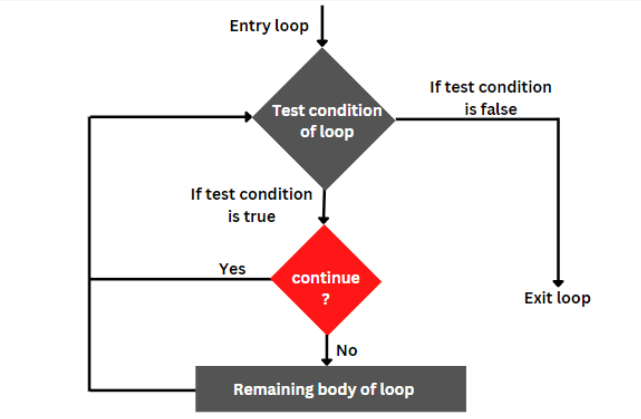
It is used when we want to skip only the current iteration of a loop and continue with the next iteration.
Unlike the break statement, the continue statement does not stop the entire loop.
Why Continue Statement is Important
The continue statement is important because it helps programs:
- skip unwanted values
- filter data
- avoid unnecessary processing
- improve loop control
- create cleaner logic
Difference Between Continue and Break
| Continue | Break |
|---|---|
| Skips one iteration | Stops entire loop |
| Loop continues | Loop ends |
| Used to ignore current value | Used to exit loop |
Real-World "Continue" Scenarios
-
Attendance: Check a list of students, but skip those who are absent.
-
Math Filters: Print all numbers from 1 to 10 but skip the negative ones.
-
Scheduling: Create a work plan but skip Saturdays and Sundays.
-
Cleaning: If you are sorting toys, skip the broken ones and keep sorting the rest.
How it Looks like
Syntax
for variable in sequence:

    if condition:
        continue

    statements
Important Point
The continue statement is usually used:
- inside loops
- together with if conditions
Example 1: The Missing Number
If we tell a loop to count to 5 but put a continue at 3:
for i in range(1, 6):
    if i == 3:
        continue
    print(i)
Output: 1, 2, 4, 5
Example 2: The While Loop Filter
i = 1
while i <= 5:
    i += 1
    if i == 3:
        continue
    print(i)
Output: 2, 4, 5, 6
Real-Time Applications of Continue Statement
| Application | Usage |
|---|---|
| Attendance Systems | Skip absent students |
| Gaming Applications | Skip invalid moves |
| Data Processing | Ignore unwanted data |
| Login Systems | Skip incorrect attempts |
| Filtering Applications | Skip invalid records |
Flow of Continue Statement
- Loop starts
- Condition is checked
- If continue condition becomes True:
- current iteration skipped
- Loop moves to next iteration
Common Beginner Mistakes
| Mistake | Problem |
|---|---|
| Using continue outside loop | Syntax error |
| Forgetting increment in while loop | Infinite loop |
| Wrong indentation | Indentation error |
| Incorrect conditions | Unexpected output |
Summary:
The continue statement in Python is used to skip the current iteration of a loop.
Important points:
- continue skips one iteration
- loop continues normally
- commonly used with if conditions
- works with both for and while loops
Continue statements are widely used in:
- filtering systems
- gaming applications
- attendance systems
- login systems
- data processing applications



