
Lists
Have you ever needed to remember a whole list of things, like your favorite movies or a grocery list? In Python, we use Lists to store many pieces of information together in one single variable.
What are Python Lists?
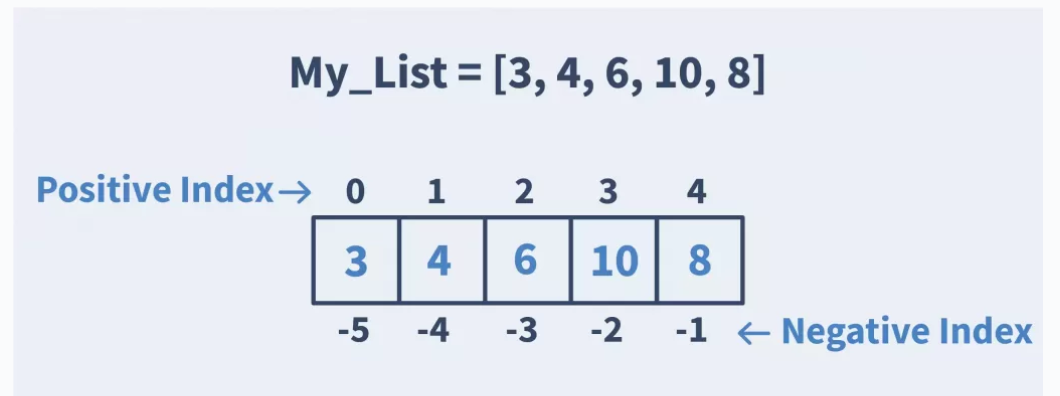
A List is a collection of items kept in a specific order. Each item in a list gets its own "seat number," which we call an index.
The most important thing to remember is that Python starts counting at 0!
-
The 1st item is at index 0.
-
The 2nd item is at index 1.
Real-World List Scenarios
-
Shopping List: ["Milk", "Bread", "Eggs"]
-
Music Playlist: A list of your favorite songs.
-
Classroom: A list of student names.
-
Gaming: A list of high scores or inventory items.
How it Looks (Syntax & Examples)
Lists are very flexible. You can add new items, update (change) them, or delete them whenever you want!
Example: Updating your Marks
# Creating a list of marks
marks = [80, 90, 75]

# Changing the first item (index 0) to 100
marks[0] = 100

print(marks)
Output: [100, 90, 75]
Summary:
-
Ordered: Python remembers exactly what order you put your items in.
-
Changeable: Unlike some other structures, you can change a list after creating it (this is called being mutable).
-
Diverse: A single list can hold numbers, words, or even other lists!
-
Index Power: You can grab any item instantly if you know its position.



