
Dictionaries
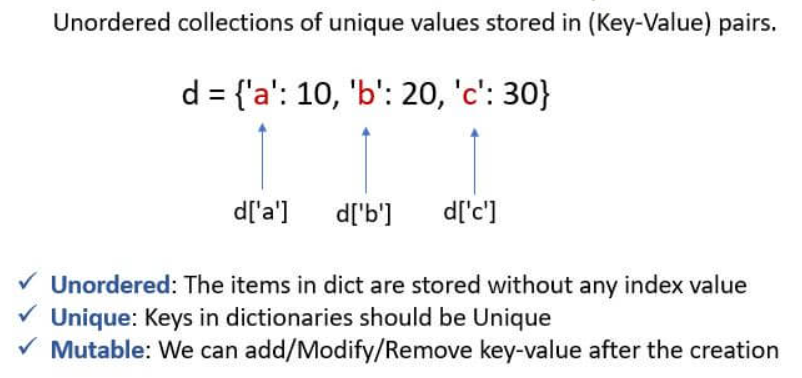
A dictionary is a collection of key : value pairs
A Dictionary is one of the most important data structures in Python programming.
It is used to store data in the form of:
Dictionaries are very useful for storing structured information such as:
- student details
- employee records
- product information
- banking data
- login credentials
Python dictionaries help programmers organize data in a fast, efficient, and meaningful way.
What is a Dictionary in Python
A dictionary is a collection that is ordered (in newer Python versions) and changeable.
-
Key-Value Pairs: Every piece of data has a "Key" (the label) and a "Value" (the information).
-
Unique Keys: Every key must be unique—you can't have two labels with the same name!
-
Curly Braces: We create dictionaries using { } and colons : to connect keys to values.
-
Fast Lookup: You can find a value instantly just by knowing its key. It’s like searching for a friend’s name in your phone contacts!
Why Dictionaries are Important
Dictionaries are important because they help programmers:
- organize data efficiently
- access values quickly
- store structured information
- manage large datasets
- improve program readability
Difference Between List, Tuple, Set, and Dictionary
| Data Type | Brackets | Ordered | Mutable |
|---|---|---|---|
| List | [ ] |
Yes | Yes |
| Tuple | ( ) |
Yes | No |
| Set | { } |
No | Yes |
| Dictionary | { } |
Yes | Yes |

Real-World Dictionary Scenarios
-
Phone Book: (Name → Phone Number)
-
Fruit Stall: ("Apple" → $2, "Banana" → $1)
-
Student Card: ("Name" → "Ram", "Grade" → 5, "Roll No" → 12)
-
Game Inventory: ("Potions" → 5, "Swords" → 2)What is a Dictionary?
Syntax
dictionary_name = {
    key1 : value1,
    key2 : value2,
    key3 : value3
}
Example 1: Finding Information
student = {"name": "Ram", "marks": 90}
print(student["name"])
Output: Ram
Example 2: Adding New Information
data = {"a": 1, "b": 2}
data["c"] = 3
print(data)
Output: {'a': 1, 'b': 2, 'c': 3}
Empty Dictionary in Python
An empty dictionary is created using:
{}Example
d = {}

print(d)

print(type(d))
Output
{}

<class 'dict'>
Important Points About Dictionaries
- dictionaries use curly brackets
{ } - data is stored using key : value
- key-value pairs are separated using commas
- keys must be unique
- dictionaries are mutable
Real-Time Applications of Dictionaries
| Application | Usage |
|---|---|
| Student Management Systems | Student details |
| Banking Applications | Account information |
| E-Commerce Websites | Product details |
| Login Systems | Username and password |
| Social Media Apps | User profile data |
Common Beginner Mistakes
| Mistake | Problem |
|---|---|
| Forgetting quotes around keys | NameError |
| Accessing invalid key | KeyError |
| Confusing set and dictionary | Incorrect data type |
| Using duplicate keys | Old value overwritten |
Advantages of Dictionaries
- fast data access
- organized structure
- easy updates
- supports dynamic data
- efficient key-based searching
Summary:
-
Mutable: You can add, change, or delete key-value pairs anytime.
-
No Duplicates for Keys: If you try to use the same key twice, the new value will overwrite the old one.
-
Structured Data: It’s the best tool for keeping related information together in one neat package.
Dictionaries are widely used in:
- banking systems
- websites
- student management systems
- e-commerce applications
- real-world software development



