
Number Guessing Game
What is Number Guessing Game?
The Number Guessing Game is a simple Python project where the computer selects a random number, and the player tries to guess the correct number.
The game gives hints like:
- Too High
- Too Low
- Correct Guess
This project is very useful for beginners to learn Python programming in a fun and interactive way.
Why This Project is Useful?
This mini project helps students learn:
- Python basics
- Random numbers
- User input
- Conditions
- Loops
- Problem-solving skills
It is one of the best beginner projects for children and school students.
Real-Life Uses
The number guessing concept is used in:
- Quiz games
- Lottery systems
- OTP generation
- Puzzle applications
- Gaming applications
Skills Learned
| Skill | Description |
|---|---|
| Random Module | Generate random numbers for the game |
| Loops | Repeat the game until the correct number is guessed |
| If-Else Conditions | Compare the user's guess with the secret number |
| User Input | Accept guesses entered by the player |
| Game Logic | Build and control interactive gameplay |
| Problem Solving | Improve logical thinking and decision-making skills |
| Tkinter GUI | Create graphical user interfaces for the game |
| Attempt Tracking | Count and display the number of guesses made |
| Error Handling | Validate user input and prevent invalid entries |
| Python Functions | Organize code into reusable blocks for better management |
Number Guessing Game Python Code
# Import random module
import random

# Computer selects a random number between 1 and 100
secret_number = random.randint(1, 100)

# Variable to count attempts
attempts = 0

print("Welcome to Number Guessing Game")
print("Guess a number between 1 and 100")

# Loop continues until correct guess
while True:

    # Take input from user
    guess = int(input("Enter your guess: "))

    # Increase attempts count
    attempts += 1

    # Check the guess
    if guess < secret_number:
        print("Too Low! Try again.")

    elif guess > secret_number:
        print("Too High! Try again.")

    else:
        print("Congratulations!")
        print("You guessed the correct number.")
        print("Total attempts:", attempts)
        break
How the Program Works
Step 1
The computer generates a random number.
Example:
secret_number = random.randint(1, 100)Step 2
The player enters a number.
Example:
Enter your guess: 50Step 3
The program compares the guessed number with the secret number.
If smaller:
Too Low!If bigger:
Too High!If correct:
Congratulations!Output
Welcome to Number Guessing Game
Guess a number between 1 and 100

Enter your guess: 30
Too Low! Try again.

Enter your guess: 80
Too High! Try again.

Enter your guess: 50
Congratulations!
You guessed the correct number.
Total attempts: 3
Python Code Using Tkinter UI
# Number Guessing Game using Python Tkinter
# This project is useful for students to learn Python in a fun way

import tkinter as tk
from tkinter import messagebox
import random

# Create the main window
root = tk.Tk()
root.title("Number Guessing Game")
root.geometry("500x400")
root.config(bg="#f0f8ff")

# Generate a random number between 1 and 100
secret_number = random.randint(1, 100)

# Count the number of attempts
attempts = 0


# Function to check the user's guess
def check_guess():
    global attempts

    # Get the number entered by the user
    user_input = entry_guess.get()

    # Check if input is empty
    if user_input == "":
        messagebox.showwarning("Warning", "Please enter a number!")
        return

    # Check if input is a valid number
    if not user_input.isdigit():
        messagebox.showerror("Error", "Please enter only numbers!")
        return

    # Convert input into integer
    guess = int(user_input)

    # Increase attempt count
    attempts += 1

    # Compare user guess with secret number
    if guess < secret_number:
        result_label.config(text="Too Low! Try a bigger number.", fg="#2563eb")
    elif guess > secret_number:
        result_label.config(text="Too High! Try a smaller number.", fg="#dc2626")
    else:
        result_label.config(
            text=f"Correct! You guessed it in {attempts} attempts.",
            fg="#16a34a"
        )
        messagebox.showinfo(
            "Congratulations!",
            f"You guessed the correct number: {secret_number}"
        )

    # Show number of attempts
    attempts_label.config(text=f"Attempts: {attempts}")

    # Clear the input box
    entry_guess.delete(0, tk.END)


# Function to restart the game
def restart_game():
    global secret_number, attempts

    # Generate a new random number
    secret_number = random.randint(1, 100)

    # Reset attempts
    attempts = 0

    # Reset labels
    result_label.config(text="Guess a number between 1 and 100", fg="#111827")
    attempts_label.config(text="Attempts: 0")

    # Clear input box
    entry_guess.delete(0, tk.END)


# Heading label
title_label = tk.Label(
    root,
    text="Number Guessing Game",
    font=("Arial", 22, "bold"),
    bg="#f0f8ff",
    fg="#1e3a8a"
)
title_label.pack(pady=20)

# Instruction label
instruction_label = tk.Label(
    root,
    text="Enter a number between 1 and 100",
    font=("Arial", 13),
    bg="#f0f8ff",
    fg="#374151"
)
instruction_label.pack(pady=5)

# Input box
entry_guess = tk.Entry(
    root,
    font=("Arial", 16),
    justify="center",
    width=15
)
entry_guess.pack(pady=10)

# Guess button
guess_button = tk.Button(
    root,
    text="Check Guess",
    font=("Arial", 13, "bold"),
    bg="#2563eb",
    fg="white",
    padx=20,
    pady=8,
    command=check_guess
)
guess_button.pack(pady=10)

# Result label
result_label = tk.Label(
    root,
    text="Guess a number between 1 and 100",
    font=("Arial", 13, "bold"),
    bg="#f0f8ff",
    fg="#111827"
)
result_label.pack(pady=10)

# Attempts label
attempts_label = tk.Label(
    root,
    text="Attempts: 0",
    font=("Arial", 12),
    bg="#f0f8ff",
    fg="#6b7280"
)
attempts_label.pack(pady=5)

# Restart button
restart_button = tk.Button(
    root,
    text="Restart Game",
    font=("Arial", 12, "bold"),
    bg="#16a34a",
    fg="white",
    padx=20,
    pady=8,
    command=restart_game
)
restart_button.pack(pady=15)

# Run the Tkinter window
root.mainloop()
How This Program Works
First, the computer selects a random number between 1 and 100.

Example:

Computer selected: 45

User enters: 30
Output: Too Low

User enters: 70
Output: Too High

User enters: 45
Output: Correct! You guessed it
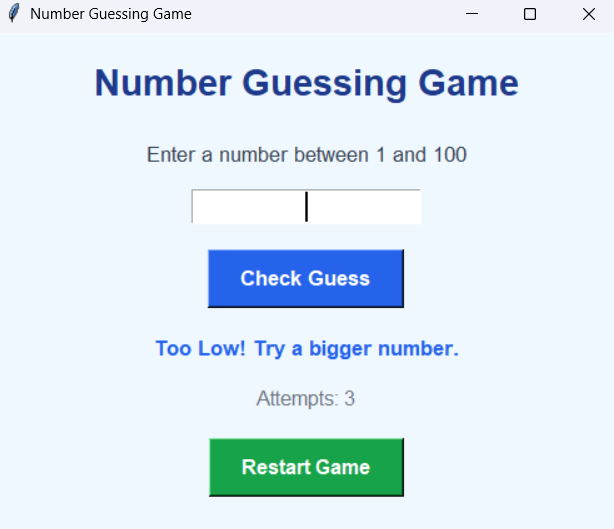
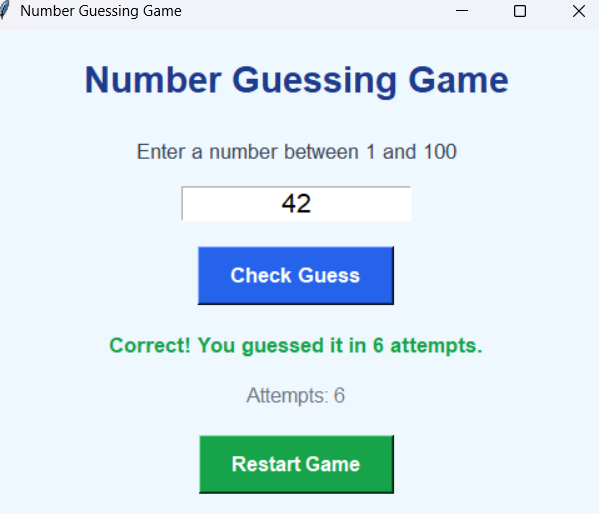
Output Screens
Explanation
Steps:
1.The program opens a window using Tkinter.
2.The computer creates a secret number using the random module.
3.The student enters a number in the input box.
4.The program checks the number.
5.It gives hints like Too High or Too Low.
6.When the correct number is guessed, it shows a success message.
How to Run the Program
Step 1: Install Python
Check Python installation:
python --versionStep 2: Create Python File
Create a file:
number_guessing_game.pyStep 3: Paste the Code
Copy the above code into the file.
Step 4: Run the Program
Open terminal and run:
python number_guessing_game.pySummary
The Number Guessing Game is a beginner-friendly Python mini project that helps students learn programming basics in a fun way. It improves logical thinking, conditions, loops, and problem-solving skills.
Keywords
Number Guessing Game Python, Python Mini Project, Python Game for Beginners, Simple Python Project, Python Coding for Kids, Beginner Python Game, Random Number Game, Python Practice Project, Python Project for Students, Easy Python Mini Project



