
Story Generator
What is Story Generator?
The Story Generator is a simple Python mini project where the program creates a funny and creative story using words entered by the user.
This project is very useful for beginners to learn Python programming in a fun and interactive way.
Why This Project is Useful?
This mini project helps students learn:
- Python basics
- String handling
- User input
- Creativity
- Sentence formation
It is one of the best beginner projects for children and school students.
Real-Life Uses
The story generator concept is used in:
| Application Area | Real-Life Use |
|---|---|
| Kids Learning Apps | Helps children improve vocabulary and creativity through storytelling. |
| Educational Games | Used in learning platforms to make education more interactive and fun. |
| Creative Writing Tools | Assists users in generating story ideas and writing prompts. |
| Chatbot Applications | Generates entertaining and personalized stories for users. |
| Storytelling Platforms | Creates customized stories based on user inputs. |
| Language Learning Apps | Helps learners practice sentence formation and language skills. |
| Entertainment Apps | Provides fun and engaging content for children and beginners. |
| Classroom Activities | Teachers can use it for creative writing exercises and group activities. |
Skills Learned
| Skill | Description |
|---|---|
| String Handling | Learn how to create and combine text using Python strings. |
| User Input | Learn how to collect information from users using the input() function. |
| Variables | Store user-entered data such as name, place, animal, and food. |
| Creativity | Develop creative thinking by generating unique and funny stories. |
| Print Statements | Display stories and messages clearly on the screen. |
| Tkinter GUI | Create a graphical user interface for better user interaction. |
| Problem Solving | Understand how to organize inputs and generate meaningful outputs. |
| Text Formatting | Learn to format and display multi-line stories using f-strings. |
Story Generator Python Code
# Simple Story Generator Program

# Taking inputs from user
name = input("Enter a name: ")
place = input("Enter a place: ")
animal = input("Enter an animal: ")
food = input("Enter a food item: ")

# Creating story
story = f"""
One day, {name} went to {place}.
There, {name} saw a funny {animal}.
The {animal} was eating {food}.
Everyone started laughing and enjoyed the moment.
"""

# Printing story
print(story)
How the Program Works
Step 1
The program asks the user to enter some words like name, place, animal, and food.
Example:Name = RaviPlace = Park
Step 2
The user enters different inputs in the program.
Example:Animal = MonkeyFood = Pizza
Step 3
The program stores all the inputs using variables.
Example:name = Ravi
Step 4
The program combines all the words and creates a funny story using strings.
Step 5
Finally, the story is displayed on the screen.
Example Output:
One day, Ravi went to Park.
There, Ravi saw a funny Monkey.
The Monkey was eating Pizza.
Everyone started laughing and enjoyed the moment.
Output
Enter a name: Ravi
Enter a place: Park
Enter an animal: Monkey
Enter a food item: Pizza
Python Code Using Tkinter UI
# Story Generator using Tkinter

import tkinter as tk

# Function to generate story
def generate_story():

    name = entry_name.get()
    place = entry_place.get()
    animal = entry_animal.get()
    food = entry_food.get()

    story = f"""
One day, {name} went to {place}.
There, {name} saw a funny {animal}.
The {animal} was eating {food}.
Everyone started laughing and enjoyed the moment.
"""

    result_label.config(text=story)

# Create window
root = tk.Tk()
root.title("Story Generator")
root.geometry("500x500")
root.config(bg="#fef3c7")

# Heading
title = tk.Label(
    root,
    text="Funny Story Generator",
    font=("Arial", 22, "bold"),
    bg="#fef3c7",
    fg="#b45309"
)
title.pack(pady=20)

# Name input
tk.Label(root, text="Enter Name", bg="#fef3c7").pack()
entry_name = tk.Entry(root, font=("Arial", 14))
entry_name.pack(pady=5)

# Place input
tk.Label(root, text="Enter Place", bg="#fef3c7").pack()
entry_place = tk.Entry(root, font=("Arial", 14))
entry_place.pack(pady=5)

# Animal input
tk.Label(root, text="Enter Animal", bg="#fef3c7").pack()
entry_animal = tk.Entry(root, font=("Arial", 14))
entry_animal.pack(pady=5)

# Food input
tk.Label(root, text="Enter Food Item", bg="#fef3c7").pack()
entry_food = tk.Entry(root, font=("Arial", 14))
entry_food.pack(pady=5)

# Generate button
generate_btn = tk.Button(
    root,
    text="Generate Story",
    font=("Arial", 14, "bold"),
    bg="#f59e0b",
    fg="white",
    command=generate_story
)
generate_btn.pack(pady=20)

# Result label
result_label = tk.Label(
    root,
    text="Your story will appear here",
    font=("Arial", 12),
    bg="#fef3c7",
    wraplength=450,
    justify="left"
)
result_label.pack(pady=20)

# Run app
root.mainloop()
Output screens
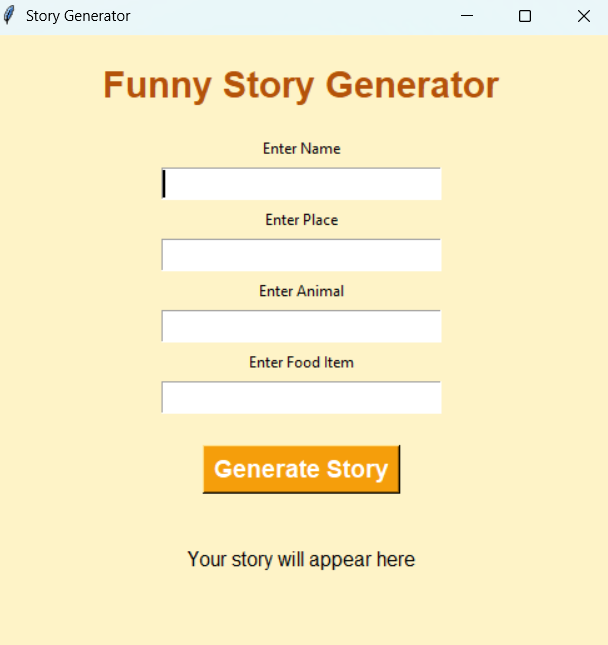
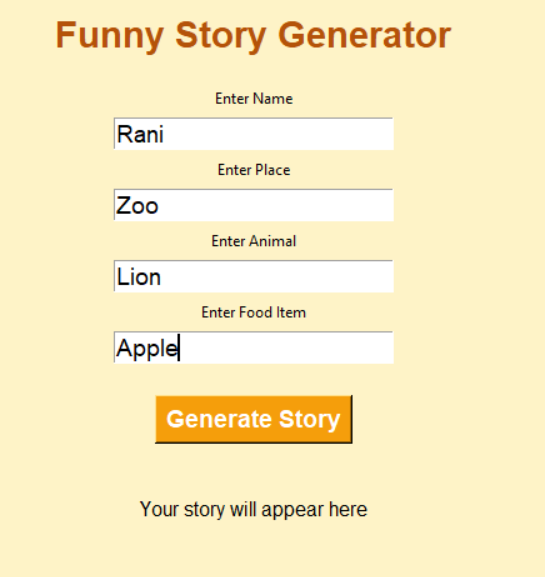
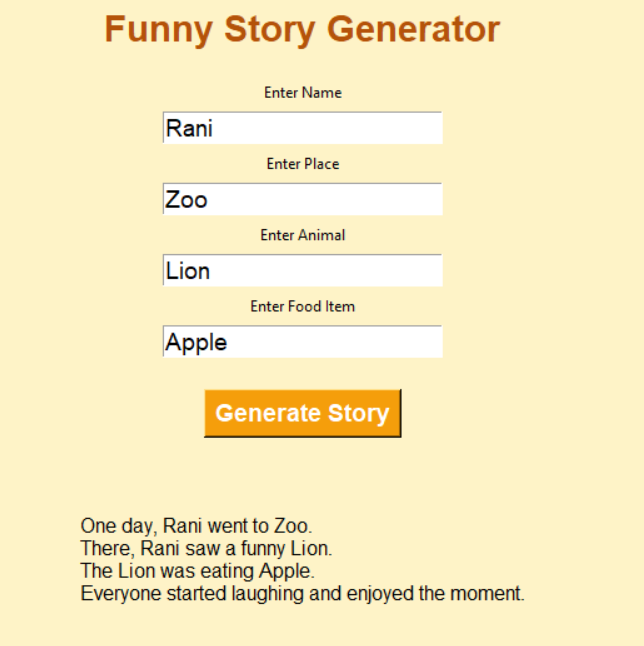
Explanation
Steps
1.The program opens a Story Generator window using Tkinter.
2.The student enters words like name, place, animal, and food.
3.When the Generate Story button is clicked, the program collects all the inputs.
4.The program combines all the words using strings and creates a funny story.
5.Finally, the story is displayed on the screen.
How to Run the Program
Step 1: Install Python
Check Python installation:
python --versionStep 2: Create Python File
Create a file named:
story_generator.pyStep 3: Paste the Code
Copy the above code into the file.
Step 4: Run the Program
Open terminal and run:
python story_generator.pySummary
The Story Generator is a simple and fun Python mini project that helps students learn strings, user input handling, and creativity in an interactive way.
Keywords
Story Generator Python, Python Mini Project, Python Story App, Tkinter Story Generator, Beginner Python Project, Python Creativity Project, Python Coding for Kids, Funny Story Generator Python, Python GUI Project, Easy Python Mini Project



