
Calculator App
What is Calculator App?
The Calculator App is a simple Python project used to perform basic mathematical operations like addition, subtraction, multiplication, and division.
This project is very useful for beginners to learn Python programming in a simple and interactive way.
Why This Project is Useful?
This mini project helps students learn:
- Python basics
- Mathematical operators
- User input
- Functions
- Conditions
- Problem-solving skills
It is one of the best beginner projects for children and school students.
Real-Life Uses
The calculator concept is used in:
- Mobile calculator apps
- Banking systems
- Shopping bill calculations
- School math applications
- Scientific calculations
Skills Learned
- Operators
- Functions
- Conditions
- User input handling
- GUI basics
Calculator App Python Code
# Simple Calculator Program

# Taking first number from user
num1 = float(input("Enter first number: "))

# Taking second number from user
num2 = float(input("Enter second number: "))

# Taking operation from user
operation = input("Enter operation (+, -, *, /): ")

# Checking operation using conditions
if operation == "+":
    print("Result:", num1 + num2)

elif operation == "-":
    print("Result:", num1 - num2)

elif operation == "*":
    print("Result:", num1 * num2)

elif operation == "/":
    if num2 != 0:
        print("Result:", num1 / num2)
    else:
        print("Cannot divide by zero")

else:
    print("Invalid operation")
How the Calculator Program Works
Step 1: The program first asks the user to enter two numbers.
Example:num1 = 10num2 = 5
Step 2: The user chooses one operation like addition, subtraction, multiplication, or division.
Example:+
Step 3: The program checks the selected operation using if-else conditions.
Example:
If the user selects +, the program does:10 + 5
If the user selects -, the program does:10 - 5
Step 4: Finally, the program calculates the answer and displays the result.
Example Output:Result: 15
Output
Enter first number: 10
Enter second number: 5
Enter operation (+, -, *, /): +

Result: 15
Python Code Using Tkinter UI
# Calculator App using Python Tkinter

import tkinter as tk

# Create main window
root = tk.Tk()
root.title("Calculator App")
root.geometry("400x450")
root.config(bg="#f0f8ff")

# Function to calculate result
def calculate():

    num1 = float(entry1.get())
    num2 = float(entry2.get())
    operation = operation_var.get()

    # Perform operations
    if operation == "+":
        result = num1 + num2

    elif operation == "-":
        result = num1 - num2

    elif operation == "*":
        result = num1 * num2

    elif operation == "/":
        if num2 != 0:
            result = num1 / num2
        else:
            result = "Cannot divide by zero"

    else:
        result = "Invalid"

    # Show result
    result_label.config(text="Result: " + str(result))


# Heading
title_label = tk.Label(
    root,
    text="Simple Calculator",
    font=("Arial", 22, "bold"),
    bg="#f0f8ff",
    fg="#1e3a8a"
)
title_label.pack(pady=20)

# First number label
label1 = tk.Label(
    root,
    text="Enter First Number",
    font=("Arial", 12),
    bg="#f0f8ff"
)
label1.pack()

# First number entry
entry1 = tk.Entry(
    root,
    font=("Arial", 16),
    justify="center"
)
entry1.pack(pady=10)

# Second number label
label2 = tk.Label(
    root,
    text="Enter Second Number",
    font=("Arial", 12),
    bg="#f0f8ff"
)
label2.pack()

# Second number entry
entry2 = tk.Entry(
    root,
    font=("Arial", 16),
    justify="center"
)
entry2.pack(pady=10)

# Operation selection
operation_var = tk.StringVar()
operation_var.set("+")

operation_menu = tk.OptionMenu(
    root,
    operation_var,
    "+",
    "-",
    "*",
    "/"
)
operation_menu.pack(pady=10)

# Calculate button
calculate_button = tk.Button(
    root,
    text="Calculate",
    font=("Arial", 14, "bold"),
    bg="#2563eb",
    fg="white",
    padx=20,
    pady=8,
    command=calculate
)
calculate_button.pack(pady=20)

# Result label
result_label = tk.Label(
    root,
    text="Result: ",
    font=("Arial", 16, "bold"),
    bg="#f0f8ff",
    fg="#111827"
)
result_label.pack(pady=10)

# Run application
root.mainloop()
Output Screens:
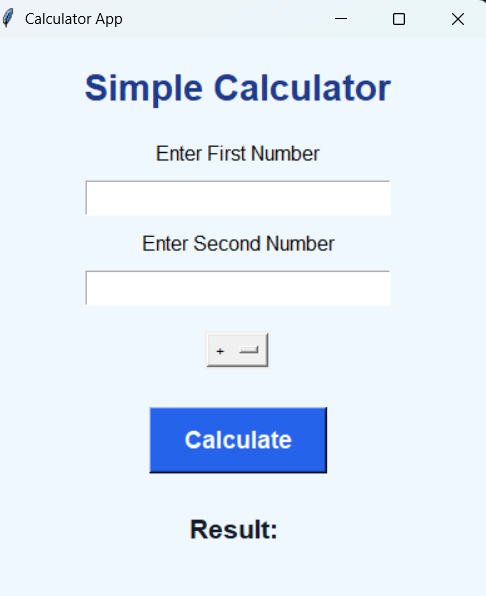
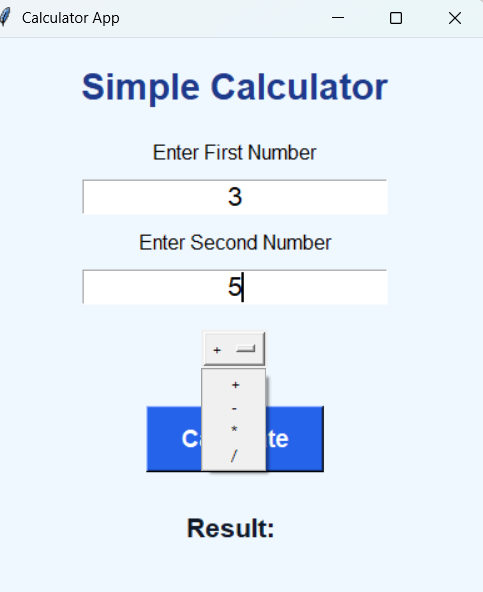
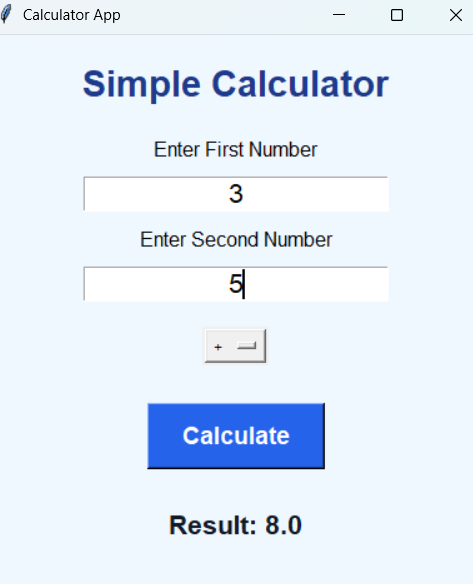
Explanation
Steps:
1.The program opens a calculator window using Tkinter.
2.The student enters two numbers in the input boxes.
3.The student selects an operation like addition, subtraction, multiplication, or division.
4.When the Calculate button is clicked, the program checks the selected operation.
5.The calculator performs the mathematical operation using Python operators.
How to Run the Program
Steps:
1. Install Python
Check Python installation using:
python --version2. Create Python File
Create a file named:
calculator_app.py3. Paste the Code
Copy the calculator code and paste it into the file.
4. Run the Program
Open terminal and run:
python calculator_app.pySummary
The Calculator App is a simple and beginner-friendly Python mini project. It helps students learn operators, conditions, functions, and basic GUI concepts in an easy and fun way.
Keywords
Calculator App Python, Python Calculator Project, Tkinter Calculator App, Python GUI Project, Beginner Python Project, Simple Python Calculator, Python Mini Project, Python Operators Project, Python Coding for Kids, Easy Python GUI App



