
Password Generator
What is Password Generator?
Python project that automatically creates secure passwords using random characters.
The generated password may contain:
- uppercase letters
- lowercase letters
- numbers
- special symbols
Why This Project is Useful?
This project helps students understand:
- Python basics
- random module
- loops
- strings
- password generation logic
It is one of the best mini projects for:
- school students
- beginners
- Python practice
- GUI application learning
Real-Life Uses
The password generator concept is used in:
| Application | Usage |
|---|---|
| Banking Applications | Secure passwords |
| Social Media Accounts | Strong login credentials |
| Websites | User account security |
| Cyber Security Tools | Password management |
| Mobile Applications | Secure authentication |
Skills Learned from this Project
| Skill | Description |
|---|---|
| Strings | Handling characters |
| Random Module | Generating random values |
| Loops | Repeating operations |
| User Input | Taking input from user |
| Password Logic | Creating secure passwords |
Password Generator Python Code
# Password Generator

import random
import string

# Combine letters, numbers, and symbols
characters = string.ascii_letters + string.digits + string.punctuation

# Ask user for password length
length = int(input("Enter password length: "))

# Generate password
password = ""

for i in range(length):
    password += random.choice(characters)

# Display password
print("Generated Password:", password)
How the Program Works
1.The program asks the user to enter the password length.
Example:8
2.The program combines letters, numbers, and symbols into one list.
3.The computer randomly selects characters using the random module.
4.The program repeats the process using a loop until the password length is completed.
5.Finally, the generated password is displayed on the screen.
Example Output:
Generated Password: A@7kP#2mOutput
Enter password length: 8
Generated Password: A@7kP#2m
Python Code Using Tkinter UI
# Password Generator using Tkinter

import tkinter as tk
import random
import string

# Function to generate password
def generate_password():

    length = int(entry_length.get())

    characters = (
        string.ascii_letters +
        string.digits +
        string.punctuation
    )

    password = ""

    # Generate password using loop
    for i in range(length):
        password += random.choice(characters)

    # Display password
    result_label.config(text="Password: " + password)

# Create window
root = tk.Tk()
root.title("Password Generator")
root.geometry("500x400")
root.config(bg="#fef9c3")

# Heading
title = tk.Label(
    root,
    text="Password Generator",
    font=("Arial", 22, "bold"),
    bg="#fef9c3",
    fg="#854d0e"
)
title.pack(pady=20)

# Instruction
instruction = tk.Label(
    root,
    text="Enter Password Length",
    font=("Arial", 13),
    bg="#fef9c3"
)
instruction.pack()

# Input box
entry_length = tk.Entry(
    root,
    font=("Arial", 16),
    justify="center"
)
entry_length.pack(pady=10)

# Generate button
generate_btn = tk.Button(
    root,
    text="Generate Password",
    font=("Arial", 14, "bold"),
    bg="#ca8a04",
    fg="white",
    command=generate_password
)
generate_btn.pack(pady=20)

# Result label
result_label = tk.Label(
    root,
    text="Password will appear here",
    font=("Arial", 14),
    bg="#fef9c3",
    fg="#111827",
    wraplength=450
)
result_label.pack(pady=20)

# Run app
root.mainloop()
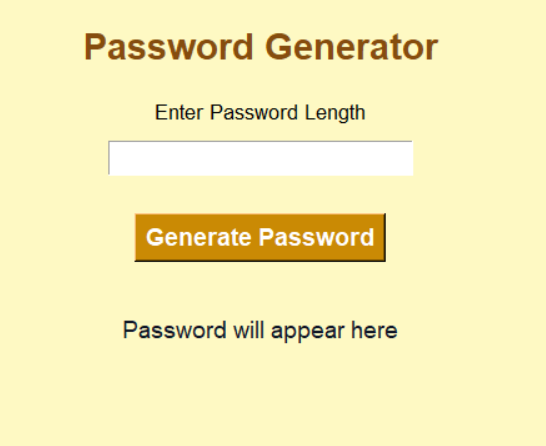
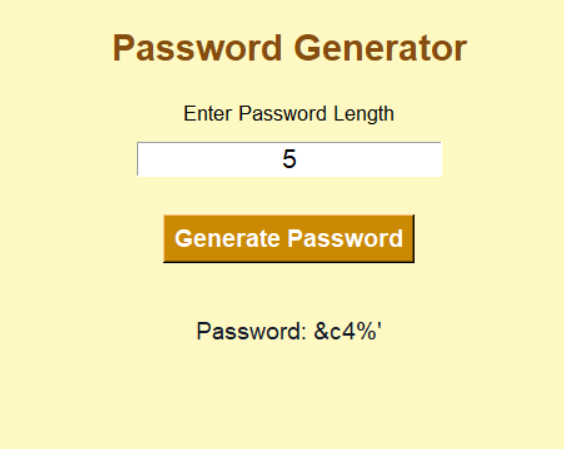
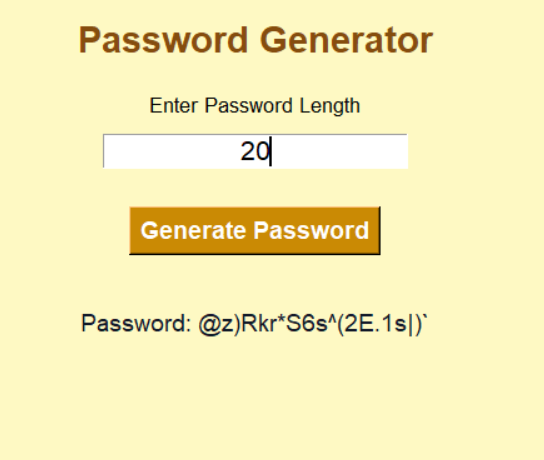
Output Screens:
Explanation
1.The program opens a Password Generator window using Tkinter.
2.The student enters the password length.
3.When the Generate Password button is clicked, the program collects the input.
4.The program uses letters, numbers, symbols, random module, and loops to create a strong password.
5.Finally, the generated password is displayed on the screen.
How to Run the Program
Steps
1.Install Python
Check Python installation:
python --version2.Create Python File
Create a file named:
password_generator.py3.Paste the Code
Copy the above code into the file.
4.Run the Program
Open terminal and run:
python password_generator.pySummary
The Password Generator is a beginner-friendly Python mini project that helps students learn strings, loops, random module, and password generation logic in a simple and fun way.
Keywords
Password Generator Python, Python Mini Project, Python Password App, Tkinter Password Generator, Beginner Python Project, Python Security Project, Python Coding for Kids, Python GUI Project, Simple Python Project, Easy Python Mini Project



