
Digital Clock
what is Digital Clock?
A Digital Clock is a simple Python project that displays the current time on a computer screen in digital format. The clock automatically updates every second and shows the current hours, minutes, and seconds.
A digital clock is one of the best beginner-friendly Python projects because it helps students learn how real-time applications work using Python.
Why This Project is Useful
This project helps students understand:
- Python basics
- Time module
- Tkinter GUI
- Functions
- Labels and widgets
- Real-time updates
Real-Life Uses
The digital clock concept is used in:
| Application | Usage |
|---|---|
| Mobile Phones | Display current time |
| Computers | System clock |
| Smart Watches | Time tracking |
| Digital Displays | Public time display |
| Alarm Systems | Time-based alerts |
Skills Learned from this Project
| Skill | Description |
|---|---|
| Time Module | Working with current time |
| Tkinter | Creating GUI applications |
| Functions | Updating clock continuously |
| Labels | Displaying text on screen |
| Event Handling | Automatic screen updates |
Digital Clock Python Code
# Digital Clock using Python

import time

while True:
    current_time = time.strftime("%H:%M:%S")
    print("Current Time:", current_time)
    time.sleep(1)
How the Program Works
1.The program imports the time module.
2.The program gets the current time from the system.
3.The time is formatted as hours, minutes, and seconds.
4.The program updates the time every second.
5.Finally, the current time is displayed on the screen.
Digital Clock Using Tkinter UI
# Digital Clock

import tkinter as tk
import time

# Function to update time
def update_time():

    current_time = time.strftime("%H:%M:%S")

    clock_label.config(text=current_time)

    clock_label.after(1000, update_time)

# Create window
root = tk.Tk()
root.title("Digital Clock")
root.geometry("500x300")
root.config(bg="black")

# Heading
title = tk.Label(
    root,
    text="Digital Clock",
    font=("Arial", 22, "bold"),
    bg="black",
    fg="cyan"
)
title.pack(pady=20)

# Clock Label
clock_label = tk.Label(
    root,
    font=("Arial", 40, "bold"),
    bg="black",
    fg="white"
)
clock_label.pack(pady=30)

# Start Clock
update_time()

# Run Application
root.mainloop()
How the Program Works
1. The program imports Tkinter and Time modules.
import tkinter as tk
import time
2. The program creates a window using Tkinter.
3. The strftime() function gets the current system time.
Example:
14:35:204. The clock label displays the current time.
5. The after() method updates the clock every second automatically.
clock_label.after(1000, update_time)6. The time keeps updating continuously until the window is closed.
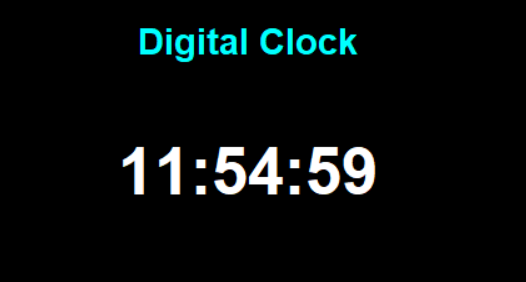
Example Output
Digital Clock

14:35:20
After one second:
14:35:21After another second:
14:35:22Output Screen
How to Run the Program
Steps
1. Install Python
Check Python installation:
python --version2. Create Python File
Create a file named:
digital_clock.py3. Paste the Code
Copy the above code into the file.
4. Run the Program
Open terminal and run:
python digital_clock.pySummary
The Digital Clock is a simple and beginner-friendly Python mini project that helps students learn Tkinter GUI development, time module usage, functions, and real-time updates. It is an excellent project for understanding how live applications work in Python.



