
Multiplication Quiz App
What is Multiplication Quiz App?
A Multiplication Quiz App is a Python-based quiz program that asks multiplication questions and checks whether the user’s answer is correct or wrong.
The app displays questions like:
What is 5 x 4?If the student enters the correct answer, the score increases. At the end of the quiz, the total score is displayed.
Why This Project is Useful?
This project helps students understand important Python concepts such as:
- Python basics
- Loops
- Conditions
- User input
- Math logic
- Score calculation
- GUI basics using Tkinter
It is one of the best Python mini projects for beginners because it is simple, practical, and easy to understand.
Real-Life Uses
The multiplication quiz concept is used in:
- Educational applications
- Online quiz platforms
- School learning systems
- Math practice games
- E-learning websites
Skills Learned
| Skill | Description |
|---|---|
| Math Logic | Used to create multiplication questions and calculate correct answers. |
| Loops | Used to repeat quiz questions multiple times automatically. |
| Conditions | Used to check whether the student's answer is correct or wrong. |
| User Input | Used to accept answers entered by the student. |
| Score Calculation | Used to count and display the total number of correct answers. |
| Tkinter GUI | Used to create a graphical user interface with buttons, labels, and input fields. |
| Variables | Used to store questions, answers, scores, and other program data. |
| Functions | Used to organize code into reusable blocks for generating questions and checking answers. |
| Random Module | Used to generate random multiplication questions for each quiz attempt. |
| Problem Solving | Helps students develop logical thinking and decision-ma |
Multiplication Quiz App Python Code
# Multiplication Quiz App

score = 0

# Ask 5 questions
for i in range(5):

    num1 = i + 2
    num2 = i + 3

    answer = int(input(f"What is {num1} x {num2}? "))

    if answer == num1 * num2:
        print("Correct!")
        score += 1
    else:
        print("Wrong!")

print("Your Score:", score)
How the Program Works
1.The program asks the student multiplication questions.
Example:What is 5 × 4?
2.The student enters an answer for each question.
Example:20
3.The program checks whether the answer is correct using conditions.
4.The score increases whenever the student gives a correct answer.
5.Finally, the total score is displayed on the screen.
Example Output:
Your Score: 4Output
What is 2 x 3? 6
Correct!

What is 3 x 4? 12
Correct!

Your Score: 5
Python Code Using Tkinter UI
# Multiplication Quiz App using Tkinter

import tkinter as tk
import random

score = 0
question_count = 0

# Generate Question
def next_question():
    global num1, num2

    num1 = random.randint(1, 10)
    num2 = random.randint(1, 10)

    question_label.config(
        text=f"What is {num1} × {num2} ?"
    )

# Check Answer
def check_answer():
    global score, question_count

    user_answer = int(answer_entry.get())

    if user_answer == num1 * num2:
        score += 1

    question_count += 1

    answer_entry.delete(0, tk.END)

    if question_count == 5:
        result_label.config(
            text=f"Quiz Finished! Score: {score}/5"
        )
    else:
        next_question()

# Create Window
root = tk.Tk()
root.title("Multiplication Quiz App")
root.geometry("500x400")
root.config(bg="#f0fdf4")

# Heading
title = tk.Label(
    root,
    text="Multiplication Quiz App",
    font=("Arial", 22, "bold"),
    bg="#f0fdf4",
    fg="#166534"
)
title.pack(pady=20)

# Question
question_label = tk.Label(
    root,
    font=("Arial", 18),
    bg="#f0fdf4"
)
question_label.pack(pady=20)

# Answer Entry
answer_entry = tk.Entry(
    root,
    font=("Arial", 16),
    justify="center"
)
answer_entry.pack(pady=10)

# Submit Button
submit_btn = tk.Button(
    root,
    text="Submit Answer",
    font=("Arial", 14, "bold"),
    bg="#22c55e",
    fg="white",
    command=check_answer
)
submit_btn.pack(pady=20)

# Result
result_label = tk.Label(
    root,
    text="",
    font=("Arial", 14),
    bg="#f0fdf4"
)
result_label.pack(pady=20)

next_question()

root.mainloop()
Explanation
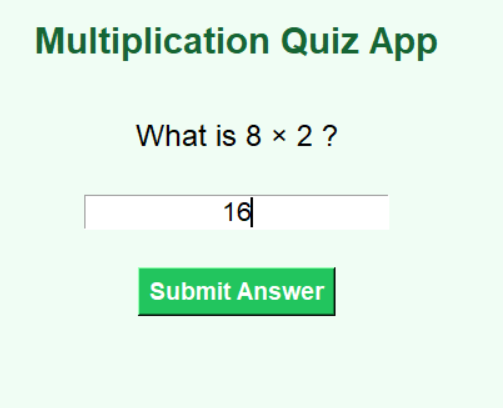
1.The program opens a Multiplication Quiz App window using Tkinter.
2.The student is shown a multiplication question.
3.The student enters an answer and clicks the Submit Answer button.
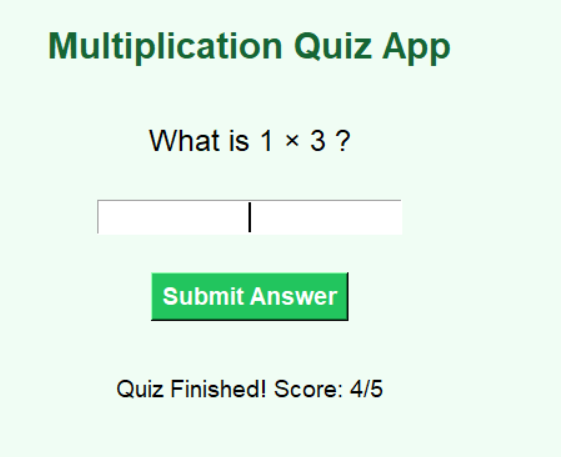
4.The program checks the answer and updates the score.
5.Finally, the total score is displayed on the screen.
How to Run the Program
Steps:
1.Install Python
Check Python installation:
python --version2.Create Python File
Create a file named:
multiplication_quiz.py3.Paste the Code
Copy the above code into the file.
4. Run the Program
Open terminal and run:
python multiplication_quiz.pyOutput Screens: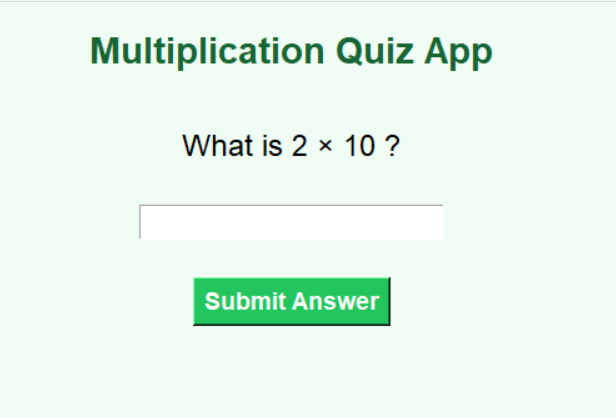
Summary
The Multiplication Quiz App is a beginner-friendly Python mini project that helps students learn math logic, loops, conditions, score calculation, and GUI basics in a simple and fun way
Keywords
Multiplication Quiz App Python, Python Mini Project, Python Quiz Game, Tkinter Quiz App, Beginner Python Project, Python Math Project, Python Coding for Kids, Python GUI Project, Simple Python Quiz, Easy Python Mini Project



