
Student Marks Calculator
What is Student Marks Calculator?
The Student Marks Calculator is a simple Python mini project where students can enter marks of different subjects and calculate the total marks, average, and grade.
This project is very useful for beginners to learn Python programming in a simple and interactive way.
Why This Project is Useful?
This mini project helps students learn:
- Python basics
- Arithmetic operations
- User input
- Conditions
- Problem-solving skills
It is one of the best beginner projects for children and school students.
Real-Life Uses
The marks calculator concept is used in:
| Application | Usage |
|---|---|
| School Result Systems | Calculating student grades |
| Report Card Software | Generating student reports |
| Student Management Systems | Storing and processing marks |
| Educational Websites | Online grade calculation |
| College Portals | Result analysis |
Skills Learned
| Skill | Description |
|---|---|
| Variables | Store marks, total, average, and grade values in the program. |
| Input Handling | Accept marks entered by students using the input() function. |
| Arithmetic Operations | Calculate total marks and average using mathematical operators. |
| Conditional Statements | Use if, elif, and else conditions to determine grades. |
| Grade Calculation | Learn how grading systems work based on average marks. |
| Problem Solving | Develop logical thinking by processing and analyzing student marks. |
| Tkinter GUI | Create a graphical interface for entering marks and displaying results. |
| Result Processing | Generate meaningful outputs such as total marks, average, and grade. |
Student Marks Calculator Python Code
# Student Marks Calculator

# Taking marks from user
maths = int(input("Enter Maths marks: "))
science = int(input("Enter Science marks: "))
english = int(input("Enter English marks: "))

# Calculating total
total = maths + science + english

# Calculating average
average = total / 3

# Checking grade
if average >= 90:
    grade = "A"

elif average >= 75:
    grade = "B"

elif average >= 50:
    grade = "C"

else:
    grade = "Fail"

# Display results
print("Total Marks:", total)
print("Average:", average)
print("Grade:", grade)
How the Program Works
1.The program asks the student to enter marks for different subjects.
Example:Maths = 90Science = 85English = 80
2.The program stores all the marks using variables.
3.The program calculates the total marks and average.
Example:90 + 85 + 80 = 255
4.The program checks the average using conditions and decides the grade.
Example:
If average is greater than 90 → Grade A
5.Finally, the total marks, average, and grade are displayed on the screen.
Example Output:
Total Marks: 255
Average: 85.0
Grade: B
Python Code Using Tkinter UI
# Student Marks Calculator using Tkinter

import tkinter as tk

# Function to calculate result
def calculate_result():

    maths = int(entry_maths.get())
    science = int(entry_science.get())
    english = int(entry_english.get())

    # Calculate total
    total = maths + science + english

    # Calculate average
    average = total / 3

    # Check grade
    if average >= 90:
        grade = "A"

    elif average >= 75:
        grade = "B"

    elif average >= 50:
        grade = "C"

    else:
        grade = "Fail"

    # Display result
    result_label.config(
        text=f"Total: {total}\nAverage: {average}\nGrade: {grade}"
    )

# Create window
root = tk.Tk()
root.title("Student Marks Calculator")
root.geometry("450x500")
root.config(bg="#e0f2fe")

# Heading
title = tk.Label(
    root,
    text="Student Marks Calculator",
    font=("Arial", 20, "bold"),
    bg="#e0f2fe",
    fg="#1d4ed8"
)
title.pack(pady=20)

# Maths marks
tk.Label(root, text="Enter Maths Marks", bg="#e0f2fe").pack()
entry_maths = tk.Entry(root, font=("Arial", 14))
entry_maths.pack(pady=5)

# Science marks
tk.Label(root, text="Enter Science Marks", bg="#e0f2fe").pack()
entry_science = tk.Entry(root, font=("Arial", 14))
entry_science.pack(pady=5)

# English marks
tk.Label(root, text="Enter English Marks", bg="#e0f2fe").pack()
entry_english = tk.Entry(root, font=("Arial", 14))
entry_english.pack(pady=5)

# Calculate button
calculate_btn = tk.Button(
    root,
    text="Calculate Result",
    font=("Arial", 14, "bold"),
    bg="#2563eb",
    fg="white",
    command=calculate_result
)
calculate_btn.pack(pady=20)

# Result label
result_label = tk.Label(
    root,
    text="Result will appear here",
    font=("Arial", 14),
    bg="#e0f2fe"
)
result_label.pack(pady=20)

# Run app
root.mainloop()
Explanation
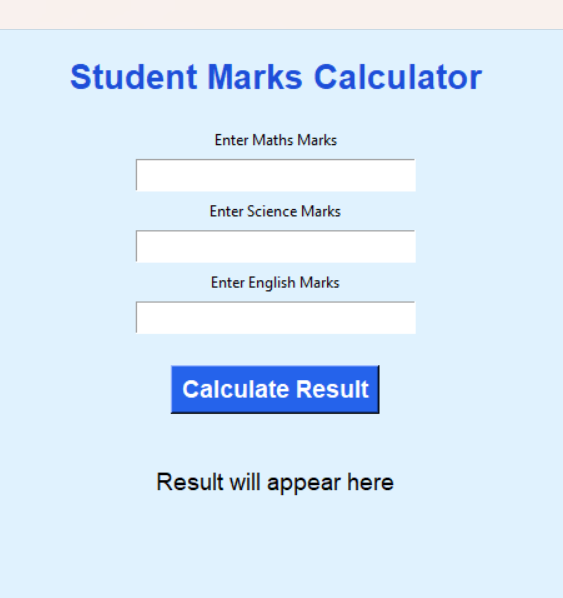
1.The program opens a Student Marks Calculator window using Tkinter.
2.The student enters marks for different subjects.
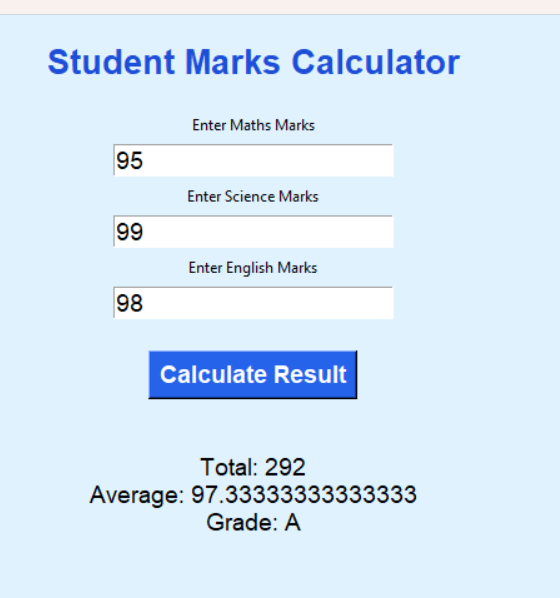
3.When the Calculate Result button is clicked, the program collects all the marks.
4.The program calculates the total marks, average, and grade using arithmetic operations and conditions.
5.Finally, the result is displayed on the screen.
How to Run the Program
Step 1: Install Python
Check Python installation:
python --versionStep 2: Create Python File
Create a file named:
student_marks_calculator.pyStep 3: Paste the Code
Copy the above code into the file.
Step 4: Run the Program
Open terminal and run:
python student_marks_calculator.pySample output Screens
Summary
The Student Marks Calculator is a beginner-friendly Python mini project that helps students learn variables, arithmetic operations, conditions, and GUI basics in a simple and fun way.
Keywords
Student Marks Calculator Python, Python Mini Project, Python Marks Calculator, Tkinter Student Project, Beginner Python Project, Python Grade Calculator, Python GUI Project, Python Coding for Kids, Simple Python Project, Easy Python Mini Project



