
Rock Paper Scissors Game
The Rock Paper Scissors Game is one of the most popular beginner-friendly Python mini projects.
In this game, the user plays against the computer by choosing:
- Rock
- Paper
- Scissors
The computer randomly selects one option, and the program decides the winner using game rules.
What is Rock Paper Scissors Game?
The Rock Paper Scissors Game is a simple Python game project where:
- the user selects Rock, Paper, or Scissors
- the computer randomly selects one choice
- the program compares both choices
- the winner is displayed on the screen
Why This Project is Useful?
This mini project helps students learn:
- Python basics
- Random module
- User input
- Conditions
- Game logic
It is one of the best beginner projects for children and school students.
Real-Life Uses
The Rock Paper Scissors concept is used in:
- Mobile games
- Fun gaming applications
- Decision-making games
- Learning applications
- Interactive Python projects
Real-Life Uses of Rock Paper Scissors Concept
The Rock Paper Scissors concept is used in:
| Application | Usage |
|---|---|
| Mobile Games | Fun entertainment games |
| Learning Applications | Teaching logic building |
| Interactive Python Projects | Beginner coding projects |
| Decision-Making Games | Randomized outcomes |
| Gaming Applications | Multiplayer mini games |
Skills Learned
| Skill | Description |
|---|---|
| Random Module | Learn how to generate random choices using Python's random module. |
| User Input Handling | Accept user selections such as Rock, Paper, or Scissors. |
| Conditional Statements | Use if, elif, and else statements to determine the winner. |
| Game Logic | Implement game rules and compare user and computer choices. |
| Decision Making | Develop logical thinking by handling different game outcomes. |
| Variables | Store user choices, computer choices, and game results. |
| Tkinter GUI | Create an interactive graphical interface for the game. |
| Problem Solving | Build practical programming skills through game development. |
Rock Paper Scissors Python Code
# Rock Paper Scissors Game

import random

# Choices list
choices = ["rock", "paper", "scissors"]

# User choice
user = input("Enter rock, paper, or scissors: ").lower()

# Computer choice
computer = random.choice(choices)

print("Computer chose:", computer)

# Checking winner
if user == computer:
    print("It's a Tie!")

elif (
    (user == "rock" and computer == "scissors") or
    (user == "paper" and computer == "rock") or
    (user == "scissors" and computer == "paper")
):
    print("You Win!")

else:
    print("Computer Wins!")
How the Program Works
1.The program asks the user to enter rock, paper, or scissors.
Example:rock
2.The computer randomly selects one choice using the random module.
Example:paper
3.The program compares the user choice with the computer choice.
4.The program checks the game rules using conditions.
Example:
Rock beats Scissors
Paper beats Rock
Scissors beats Paper
5.Finally, the program displays the winner on the screen.
Example Output:
Computer chose: paper
Computer Wins!
Output
Enter rock, paper, or scissors: rock
Computer chose: scissors
You Win!
Python Code Using Tkinter UI
# Rock Paper Scissors using Tkinter

import tkinter as tk
import random

# Choices
choices = ["Rock", "Paper", "Scissors"]

# Function to play game
def play(user_choice):

    computer_choice = random.choice(choices)

    # Check result
    if user_choice == computer_choice:
        result = "It's a Tie!"

    elif (
        (user_choice == "Rock" and computer_choice == "Scissors") or
        (user_choice == "Paper" and computer_choice == "Rock") or
        (user_choice == "Scissors" and computer_choice == "Paper")
    ):
        result = "You Win!"

    else:
        result = "Computer Wins!"

    # Show result
    result_label.config(
        text=f"Your Choice: {user_choice}\nComputer Choice: {computer_choice}\n\n{result}"
    )

# Create window
root = tk.Tk()
root.title("Rock Paper Scissors Game")
root.geometry("500x500")
root.config(bg="#f3f4f6")

# Heading
title = tk.Label(
    root,
    text="Rock Paper Scissors",
    font=("Arial", 22, "bold"),
    bg="#f3f4f6",
    fg="#1d4ed8"
)
title.pack(pady=20)

# Buttons
rock_btn = tk.Button(
    root,
    text="Rock",
    font=("Arial", 14, "bold"),
    bg="#2563eb",
    fg="white",
    width=12,
    command=lambda: play("Rock")
)
rock_btn.pack(pady=10)

paper_btn = tk.Button(
    root,
    text="Paper",
    font=("Arial", 14, "bold"),
    bg="#16a34a",
    fg="white",
    width=12,
    command=lambda: play("Paper")
)
paper_btn.pack(pady=10)

scissors_btn = tk.Button(
    root,
    text="Scissors",
    font=("Arial", 14, "bold"),
    bg="#dc2626",
    fg="white",
    width=12,
    command=lambda: play("Scissors")
)
scissors_btn.pack(pady=10)

# Result label
result_label = tk.Label(
    root,
    text="Choose Rock, Paper, or Scissors",
    font=("Arial", 14),
    bg="#f3f4f6",
    fg="#111827"
)
result_label.pack(pady=30)

# Run app
root.mainloop()
Sample output screens
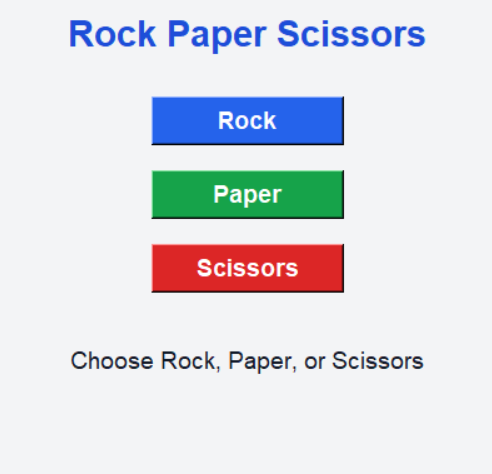
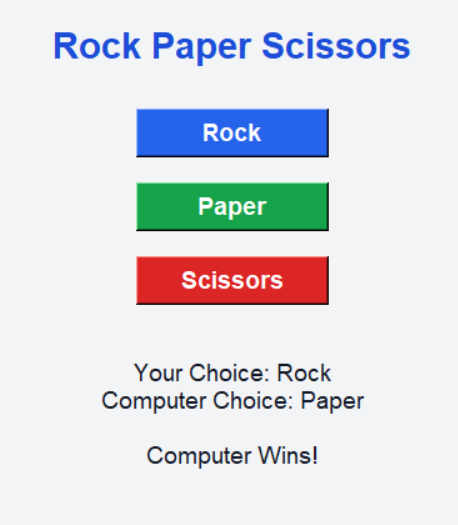
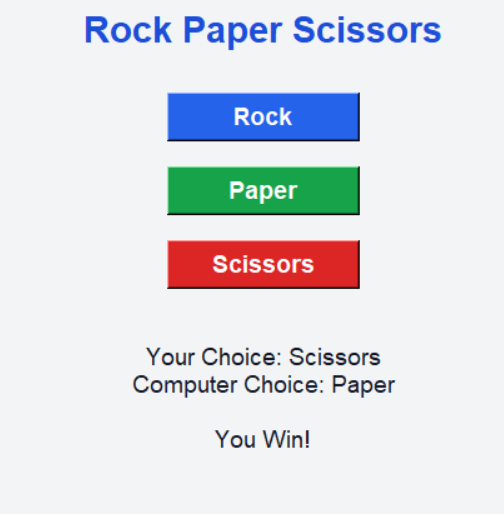
Explanation
1.The program opens a Rock Paper Scissors Game window using Tkinter.
2.The student selects Rock, Paper, or Scissors.
3.The computer randomly chooses one option.
4.The program checks the winner using game rules and conditions.
5.Finally, the result is displayed on the screen.
How to Run the Program
1.Install Python
Check Python installation:
python --version2.Create Python File
Create a file named:
rock_paper_scissors.py3.Paste the Code
Copy the above code into the file.
4.Run the Program
Open terminal and run:
python rock_paper_scissors.pySummary
The Rock Paper Scissors Game is a beginner-friendly Python mini project that helps students learn random module, conditions, user input handling, and game logic in a simple and fun way.
Keywords
Rock Paper Scissors Python, Python Mini Project, Python Game Project, Tkinter Game Project, Beginner Python Project, Python Coding for Kids, Python GUI Game, Simple Python Game, Python Random Module Project, Easy Python Mini Project



